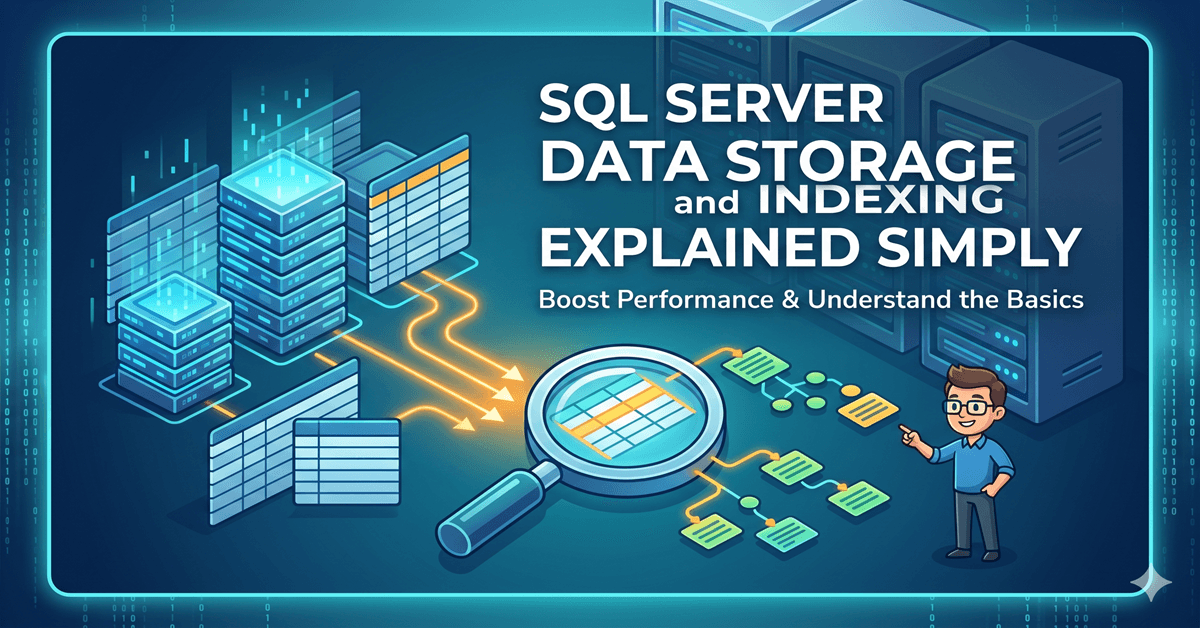
SQL Server Data Storage and Indexing Explained Simply.
Most people learn SQL by writing queries. They learn SELECT, JOIN, GROUP BY, and WHERE clauses. They practice retrieving data from tables and filtering records. Over time, they become comfortable writing SQL statements and understanding SQL Server data storage and indexing. But there is one question that many people never stop to ask:
When you run a query, where does SQL Server actually find the data?
When you write:
SELECT * FROM Customerswhat really happens behind the scenes? SQL Server does not magically know where a row exists. It must physically store data somewhere. It must organize records in a predictable structure. It must know how to retrieve information quickly without scanning everything repeatedly. This is where storage architecture and indexing become important. Understanding how SQL Server stores data is not just useful for database administrators. It helps developers, analysts, data engineers, and interview candidates understand why some queries run instantly while others become painfully slow. This article is written for beginners and working professionals who want to understand SQL Server conceptually — not as a memorization topic, but as a system that follows logic.
Why SQL Server Data Storage and Indexing Matters
Many beginners think databases behave like Excel sheets. Rows exist in a table. Queries read rows. Results appear. That mental model works initially, but it becomes limiting once databases grow larger. A table with 1,000 rows behaves differently from a table with 50 million rows. At smaller sizes, poor query design may still work. But as volume grows, storage structure becomes important.
SQL Server must answer questions such as:
- Where exactly is a row stored?
- How can rows be found quickly?
- How does SQL Server avoid scanning the entire table every time?
- What happens when new rows are inserted?
- How does indexing reduce search time?
Understanding storage helps explain performance. It also explains why indexing is not optional in enterprise systems.
SQL Server Does Not Store Data Row by Row Randomly
A database table may appear simple on the surface. But internally, SQL Server stores data using organized physical units. The most important storage unit inside SQL Server is called a page. Everything begins with pages. SQL Server stores rows inside pages. A page is the smallest unit of storage SQL Server uses for reading and writing data. Every page has a fixed size.
What Is a Page in SQL Server?
SQL Server stores data in 8KB pages. That means every table row eventually lives inside one or more 8KB storage blocks. You can think of a page like a container. Instead of placing every row directly into a giant table space, SQL Server groups rows into structured pages.
For example:
- Page 1 contains several rows
- Page 2 contains the next group of rows
- Page 3 contains another group
This organization makes storage manageable. When SQL Server needs data, it reads pages rather than individual rows. That detail matters. Databases do not retrieve one row at a time from disk. They retrieve pages. If SQL Server wants one row from a page, it often loads the entire page into memory.
This explains why efficient page usage matters for performance.
A Simple Example of Pages
Imagine a Customers table.
| CustomerID | Name | City |
| 1 | Rahul | Delhi |
| 2 | Sneha | Mumbai |
| 3 | Nikhil | Pune |
Even though the table appears simple, SQL Server internally stores these rows inside pages. A page may contain dozens or hundreds of rows depending on row size. If a row becomes too large, fewer rows fit into a page. If rows are smaller, more records fit. This is why table design influences performance. Wide tables consume more storage. Narrow tables fit more rows per page. More rows per page often means fewer disk reads. Fewer disk reads usually mean faster queries.
What Happens When a Page Gets Full?
Pages do not grow endlessly. Each page has a strict 8KB size. When a page becomes full, SQL Server must create additional storage space. This introduces an important concept. SQL Server allocates new pages as needed. Rows continue getting stored in newly assigned pages. However, storage order becomes important. If data must remain sorted, SQL Server may split pages. This leads to a concept called page split. A page split happens when SQL Server needs to insert a row into a page that no longer has space. Instead of rejecting the insert, SQL Server creates a new page and redistributes rows.
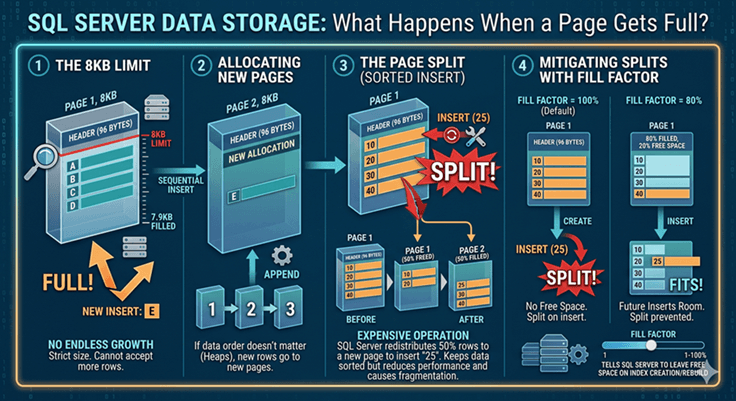
For example, imagine rows sorted by CustomerID. If a new CustomerID must be inserted between existing records and the page has no remaining space, SQL Server creates another page and shifts rows accordingly. This keeps the order intact, but it also increases storage work. Page splits are not always harmful. But frequent page splits can reduce insert performance and create fragmentation.This is why SQL Server provides a setting called Fill Factor. Fill Factor tells SQL Server to leave some free space inside pages when indexes are created or rebuilt. For example, a Fill Factor of 80 means SQL Server fills pages to roughly 80% capacity initially. The remaining space gives future inserts room to fit without immediately triggering page splits. This becomes especially useful in tables where inserts happen frequently.
What Is an Extent?
Pages do not exist individually forever. SQL Server groups pages into larger logical units called extents. An extent contains 8 pages. Since each page is 8KB, an extent equals 64KB. Why does SQL Server use extents? Because allocating storage page by page becomes inefficient. Instead of assigning pages individually, SQL Server often allocates extents. This improves storage management. Think of it like renting apartments. Instead of renting one room at a time, SQL Server often reserves an entire block. This makes allocation faster and easier to manage.
Heap Tables — When Data Has No Order
A table without a clustered index is called a heap. Heap storage is simple. Rows are inserted wherever free space exists. No specific order is maintained.
For example:
If you insert rows in random order, SQL Server simply places them where space is available. This sounds efficient initially. But retrieval becomes difficult. Without order, SQL Server may scan many pages to find rows. This often causes table scans. Table scans become expensive when row counts grow. Small tables may not suffer. Large enterprise tables often do.
Clustered Index — Where Storage Changes Completely
A clustered index changes how SQL Server stores data.Instead of random placement, rows become physically organized based on index order.
For example:
If a clustered index exists on CustomerID, SQL Server stores rows in CustomerID order. This means:
- CustomerID 1 appears near CustomerID 2
- CustomerID 2 appears near CustomerID 3
- Rows remain logically sorted
This matters because searching becomes faster. SQL Server no longer guesses where rows exist. It follows an organized structure. A clustered index is often compared to a phone book. If names are sorted alphabetically, finding a person becomes easier. Without ordering, every page must be searched.
Why Clustered Indexes Improve Performance
Suppose you run:
SELECT * FROM Customers WHERE CustomerID = 1500Without indexing, SQL Server may scan large portions of the table. With a clustered index, SQL Server can navigate directly to the correct location. This reduces unnecessary reads.
Less scanning means:
- Faster queries
- Reduced disk usage
- Better memory efficiency
- Lower server pressure
This is why clustered indexes are common on primary keys.
What Is a Non-clustered Index?
A clustered index changes storage order. A nonclustered index works differently. It creates a separate lookup structure. You can think of a nonclustered index like a book index. At the end of a book, topics appear alphabetically. Each topic points to a page number. The book itself remains unchanged. Similarly, a non-clustered index does not reorder table storage. Instead, it creates a searchable map.
For example:
A non-clustered index on City may store:
| City | Pointer |
| Pune | Row Location |
| Mumbai | Row Location |
| Delhi | Row Location |
When SQL Server searches by City, it first checks the index. Then it jumps to the correct row location. This avoids scanning the full table.
Clustered vs Nonclustered Index — Practical Difference
Clustered indexes affect how rows are physically stored. Non-clustered indexes create separate search structures. A table can have only one clustered index. But it can have multiple nonclustered indexes.
For example:
A Customers table may have:
- Clustered index on CustomerID
- Nonclustered index on Email
- Nonclustered index on City
Each index helps different search patterns. Choosing indexes depends on how queries behave.
What Happens Internally When You Run a Query?
Suppose you execute:
SELECT * FROM Orders WHERE OrderID = 1000SQL Server follows a decision process.
It checks:
- Does an index exist?
- Can the index help?
- Should a table scan happen?
- Which path costs less?
This decision comes from the query optimizer. The optimizer chooses an execution plan. Execution plans determine how SQL Server reads data. If an index exists, SQL Server may perform an Index Seek. If no useful index exists, SQL Server may perform an Index Scan or Table Scan. These terms appear frequently in interviews. Understanding them conceptually makes performance troubleshooting easier. If you use SQL Server Management Studio (SSMS), you can view execution plans visually. Before running a query, press Ctrl + M to enable the actual execution plan. After execution, SQL Server displays how data was retrieved.
You may see operators such as:
- Index Seek
- Index Scan
- Key Lookup
- Table Scan
This gives practical visibility into how SQL Server makes decisions internally.
Index Seek vs Index Scan
An Index Seek means SQL Server directly jumps to the needed data. This is usually efficient. An Index Scan means SQL Server checks many index pages. This may still be acceptable for moderate data sizes. A Table Scan means SQL Server checks the full table. For small tables, this is fine. For large tables, it becomes expensive. The goal is not to avoid scans entirely. The goal is to help SQL Server choose the cheapest path.
Why Too Many Indexes Become a Problem
Indexes improve reading speed. But they are not free. Every index consumes storage. Every insert or update must maintain indexes.
For example:
If a table has 12 indexes, inserting one row may require updating all 12 index structures. This increases write cost. Too many indexes can create:
- Slower inserts
- Slower updates
- Higher maintenance cost
- Fragmentation
Good database design balances reads and writes. Indexing is not about creating as many indexes as possible. It is about creating useful indexes.
A Simple Way to Think About It
Imagine a large library. Without organization, finding one book becomes difficult. You may search every shelf. SQL Server without indexes behaves similarly. Now imagine books sorted by category, author, and subject. You no longer search randomly. You navigate directly. That is what indexing provides. It does not create new data. It creates faster access to existing data.
Most people focus only on writing SQL queries. But query performance often depends on what happens underneath. Storage structure, page organization, indexing strategy, and execution decisions all influence how quickly SQL Server can retrieve data. The next time a query feels slow, it may not be the SQL syntax that needs attention. It may be the way data is stored. Understanding SQL Server storage gives you a better mental model of how databases behave. And once you understand that, troubleshooting performance becomes less about guessing and more about reasoning.
[7215]789win | Đăng nhập, tải app và hướng dẫn chơi nổ hũ,789win hỗ trợ đăng nhập nhanh, tải app mượt mà cùng hướng dẫn nạp tiền qua Momo casino tiện lợi. Khám phá mẹo quay hũ nổ hũ cực chuẩn và tham gia ngay hôm nay. visit: 789win
The bonus offers here are just insane. I managed to double my initial deposit within an hour. You guys should really try bd09bte if you love rewards.
Really impressed with the variety of games available here. There is always something new to try and the bonuses are actually generous. Give idtaipan77 a shot!