Databricks 10GB File Processing Explained Step by Step.
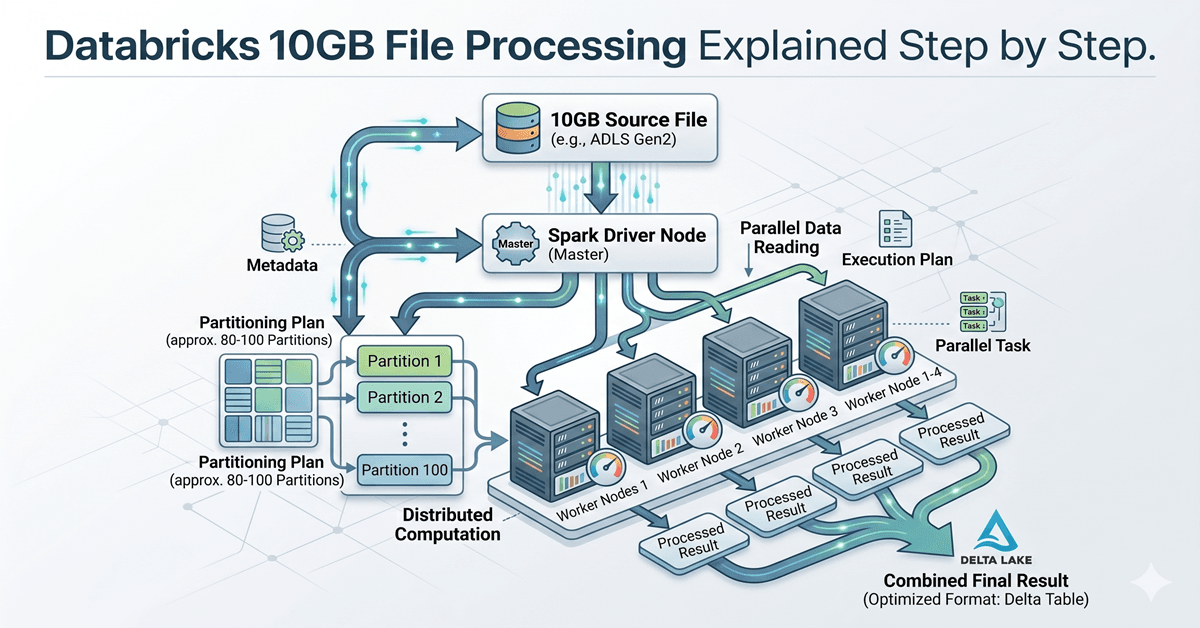
Databricks 10GB file processing sounds complex at first, especially when you imagine loading a massive file into memory. But Databricks processes large files differently by splitting data into partitions and distributing work across clusters. Understanding Databricks 10GB file processing helps beginners understand how Spark handles scale efficiently.
This creates a natural assumption:
“If a file is 10GB, processing it must require a very powerful machine.”
That assumption makes sense in traditional computing.But Databricks works differently.
In Databricks, a 10GB file is not treated as one heavy object that must be loaded into memory at once. Instead, the system breaks the file into smaller pieces, distributes the workload across multiple machines, and processes everything in parallel.
This article is written for beginners, career switchers, and people entering the data engineering or analytics world who want to understand how Databricks thinks about large files — not just memorize definitions.
Why a 10GB File Feels Big on a Laptop but Normal in Databricks
When you work on a local computer, most operations depend on a single machine.
Your laptop has:
- One processor
- Limited memory
- Limited storage bandwidth
- Limited ability to process multiple heavy operations simultaneously
If you try to load a 10GB CSV file locally, the system may attempt to read a large portion of that data into memory.This becomes difficult because traditional applications are designed for single-machine execution.Databricks follows a completely different philosophy.Instead of depending on one machine, it uses distributed computing. Distributed computing means multiple machines share work.
This difference is the reason Databricks can comfortably process files that would crash a normal desktop environment.
First, Where Does the File Actually Live?
A common beginner misconception is that Databricks stores files internally. In reality, Databricks usually does not act as long-term storage. A 10GB file typically sits in cloud storage such as:
- Amazon S3
- Azure Data Lake Storage
- Google Cloud Storage
Databricks connects to these storage systems and processes data from there. This separation is important. Storage and compute are treated independently. Cloud storage keeps the file safely stored. Databricks provides the computing power needed to read and process it. This separation creates flexibility. You can keep thousands of files stored cheaply while scaling processing power only when required.
For example, a company may store several years of customer transactions in cloud storage but only spin up a Databricks cluster when analysis is needed.
Step 1: Databricks Does Not Read the Entire File at Once
When Databricks reads a file, Spark does not immediately load the full 10GB into memory. Instead, Spark creates smaller logical pieces called partitions. A partition is simply a chunk of data that can be processed independently. Think of a large book. If one person reads all 500 pages, the process takes longer. But if ten people each read 50 pages simultaneously, the work finishes faster. That is exactly how Spark approaches large data. The file is divided into manageable sections so multiple workers can process them simultaneously.
This is one of the core ideas behind distributed systems.
Databricks 10GB File Processing Through Partitions
This is where many beginner articles stay vague.
Let’s make it practical.
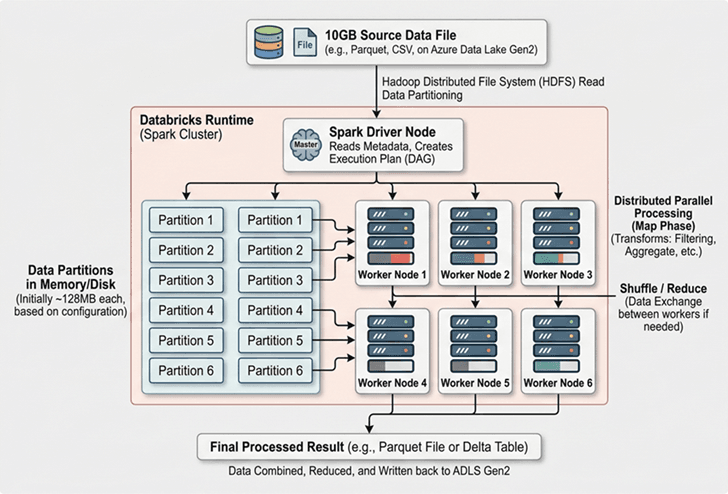
Spark typically works with partition sizes around 128MB by default. This is not a strict rule, but it is commonly used as a baseline. If you divide 10GB by 128MB, the file may result in roughly 80 partitions. Here is a simplified calculation:
10GB = approximately 10,240MB
10,240MB / 128MB = around 80 partitions
This means Spark may divide the file into around 80 manageable chunks. Each partition becomes an independent task. That matters because tasks can run in parallel. Instead of processing 10GB sequentially, Spark processes many partitions at the same time.
The exact number of partitions may change depending on:
- File format
- Compression
- Cluster configuration
- Spark settings
- Data source
But the important idea remains the same:
Databricks works by splitting work, not by scaling one machine endlessly.
Step 2: Databricks 10GB File Processing Inside Clusters
Databricks runs workloads using clusters. A cluster is a group of machines working together.
A simple cluster may contain:
- 1 Driver Node
- 4 Worker Nodes
The Driver Node acts like a coordinator.
It decides:
- What work exists
- Which tasks must run
- Which worker gets which partition
The Worker Nodes perform actual processing. Each worker receives a portion of the data.
For example:
- Worker 1 processes partitions 1–20
- Worker 2 processes partitions 21–40
- Worker 3 processes partitions 41–60
- Worker 4 processes partitions 61–80
This division allows processing to happen simultaneously. Instead of waiting for one machine to finish everything, multiple workers contribute. This parallel execution dramatically reduces runtime.
Visual Understanding — How a 10GB File Gets Processed
Step 3: Spark Does Not Execute Immediately
One of the most misunderstood concepts in Spark is lazy execution. When beginners write code, they often assume Spark immediately runs every line. That is not how Spark behaves.
For example:
sales_df = spark.read.csv("sales.csv")
filtered_df = sales_df.filter("country = 'India'")
city_df = filtered_df.groupBy("city").count()
Many people assume Spark processes the data after every line. But Spark usually waits. Instead of running instantly, Spark builds a logical plan.
It studies:
- Which file must be read
- Which filters exist
- Which grouping operation is needed
- Which transformations can be optimized
Nothing actually executes until an action happens.
For example:
city_df.show()This .show() command triggers execution.
At that moment, Spark begins reading partitions and distributing work. This behavior is called lazy execution. Spark waits until it truly needs a result. This improves performance because unnecessary work gets avoided.
Why Lazy Execution Matters for Large Files
Without lazy execution, Spark might repeatedly scan the same 10GB file after every command. That would waste processing time. Instead, Spark creates an optimized plan before touching data.
This means Spark can:
- Combine operations
- Reduce repeated scanning
- Push filters earlier
- Minimize memory usage
For large datasets, this optimization becomes extremely valuable. Even a small reduction in unnecessary processing can save minutes or hours in enterprise workloads.
Step 4: Memory Does Not Need to Hold Everything
One major misconception is that Databricks must load the entire file into RAM. This is not true. Spark processes data in chunks. Each worker loads only relevant partitions. If memory becomes limited, Spark can temporarily spill intermediate data to disk. This prevents system crashes. A local laptop often fails because it tries to load too much at once. Databricks avoids this by distributing memory usage across machines.
This architecture makes large-file processing more reliable.
Why File Format Changes Everything
A 10GB CSV file and a 10GB Parquet file are not equal. This is an important concept many beginners overlook. CSV is a text-based format. Spark must scan the file row by row. Parquet works differently. Parquet stores data in columns. That means Spark can read only required columns instead of scanning everything.
For example:
Imagine a sales table with 30 columns.
If you only need:
- customer_id
- purchase_amount
- city
Spark may read only those columns from a Parquet file. With CSV, Spark still scans the entire file. This is why Parquet usually performs better. Databricks strongly encourages columnar storage formats for large-scale workloads.
Why Databricks Often Converts Data into Delta Tables
Raw files are useful for ingestion. But enterprise systems rarely keep querying large CSV files repeatedly. Databricks often converts raw files into Delta format. Delta Lake improves performance because it adds structure and metadata.
Delta tables support:
- Faster reads
- ACID reliability
- Incremental updates
- Schema enforcement
- Better optimization
For example, if a company processes daily sales files, Databricks may convert each incoming file into a Delta table. Over time, querying becomes faster because Spark understands the table structure. This reduces repeated scanning and improves reliability.
A Real Enterprise Example
Imagine an e-commerce company uploading a 10GB daily order file.
The file contains:
- Customer orders
- Product details
- Payment information
- Delivery timestamps
- City-level sales records
If processed traditionally, one server would attempt to read everything sequentially. Databricks works differently. The file gets partitioned. Workers process separate chunks. Spark applies filters. Aggregations happen in parallel.
The final result may answer questions such as:
- Which cities generated the highest sales?
- Which products performed best?
- Which payment methods failed most frequently?
Even though the source file is 10GB, the user experiences the result as one query. That simplicity hides substantial complexity underneath.
Common Beginner Mistakes
Many beginners entering Databricks make similar assumptions. One common misunderstanding is believing cluster size alone solves performance issues. More machines help, but poor partitioning still causes bottlenecks. Another mistake is assuming CSV works fine for everything. CSV may work initially, but performance often improves afte
A 10GB file may feel large on a personal computer, but Databricks processes it differently by using distributed computing. Instead of loading the entire file into memory, Spark divides it into partitions and distributes those partitions across multiple worker nodes inside a cluster. This parallel processing reduces execution time and avoids memory limitations. Understanding how Databricks processes large files is less about memorizing technical terms and more about understanding the architecture behind modern data systems. Concepts like partitioning, lazy execution, cluster coordination, and optimized file formats help explain why platforms like Databricks scale efficiently.
For beginners, the key takeaway is simple: Databricks does not make one machine stronger — it makes many machines work together intelligently. Databricks 10GB file processing becomes easier to understand once you see how Spark partitions data across clusters.
[9187]mr888: Login Daftar Slot Gacor Deposit Dana Terpercaya,mr888 menyediakan akses login dan daftar mr888 apk dengan mudah. Nikmati slot gacor gampang menang serta judi online deposit dana. Gabung sekarang juga! visit: mr888
Finally found a place where the bonuses actually make sense. Great experience so far and the loading speed is impressive. Visit briwin600
I am preparing a small set of Suno stems for a community project, and the last export left faint clicks and metallic tails between phrases. The tracks are usable, yet those details become distracting on headphones. I do not need a dramatic remake; I want careful cleanup that preserves timing and the character of the vocals. While comparing practical options, I found this comparison page. It gave me a starting point, but I would value advice from people who have tested similar tools. I am trying to decide whether selective repair belongs before or after a light EQ pass. My first concern is retaining natural vocal detail. A quiet test render seems appropriate. I can compare a few sections without changing the whole track. The repair should remain subtle. Any processed layer must align precisely with the original. I also need repeatable settings for later revisions. A brief listening session may reveal more than meters alone. The final mix should still feel balanced. The chosen steps must be quick to document. I will also listen at comfortable volume. I would rather leave a minor flaw than create a new one. Has anyone found a dependable order for this kind of conservative repair? Examples from recent mixes would help.
Hola a todos, estoy planeando un viaje a Tenerife y quisiera practicar jetski durante mi estancia. Me puse a investigar sobre los dos lugares mas populares para esta actividad: Los Gigantes y Playa de las Americas. Por lo que he visto, Los Gigantes tiene unos acantilados majestuosos que creo que crearian un marco visual magnifico mientras estas sobre el agua, pero he leido que puede ser un poco mas complejo para alguien con nivel intermedio, especialmente con el oleaje y las corrientes que no son faciles de manejar. Por otro lado, Playa de las Americas parece una opcion mas accesible y tranquila, ideal para vivir la experiencia sin agobios, aunque el paisaje no es tan espectacular. Para alguien que quiere disfrutar de buenas vistas sin perder la calma, ?cual recomendarian? He encontrado un post con fotos y informacion que ayuda a decidir entre ambos sitios jet ski tenerife los gigantes , pero me encantaria escuchar experiencias reales de quienes hayan probado jetski en ambos sitios. ?Cual creen que tiene mejor ambiente para alguien como yo que busca un nivel medio y vistas hermosas? Les agradezco de antemano sus opiniones.
The mobile version works perfectly and I can play anywhere on the go. Very convenient and fast loading times. Try 17jilicasinologin for a smooth ride.
I’ve tried a few sites lately but this one really stands out. The interface is smooth and the payouts are fast. Definitely checking out br2nn more often.
Great platform with a very user friendly design. I feel safe depositing here and the wins are real. Check out nogad88app!
I have been trying to understand my color season, but the outcome keeps moving between two neighboring palettes. One tool places me in Soft Summer while another leans toward Soft Autumn. My skin is fairly neutral and both muted ranges seem plausible in indoor light. I tested with a handful of daylight images but camera settings may be influencing what I see. Before changing my wardrobe I would like a more repeatable way to compare the options. seasonal palette test looks like a useful checklist rather than a final verdict. Would you give undertone the most weight or compare chroma and contrast before temperature? I can gather some simple color drapes so I am happy to do a careful home check. I can use indirect daylight and I can keep the camera exposure fixed. Which clues would show you that one muted season is more accurate than the other? I am looking for repeatable comparisons from people who have worked through a similar overlap. Another question is avoiding changes caused only by camera white balance. I would additionally appreciate knowing how many comparisons are usually enough before a pattern becomes clear. I would be grateful for your thoughts
I am trying to choose between Soft Winter and Deep Winter before replacing a few wardrobe basics. The comparison boards I have found make both directions seem reasonable when I look at them separately. Because my overall contrast is not obvious, I do not want to assume that the deepest colours are automatically best. Near a window some berry shades look clear while others make my face seem flatter. I keep testing charcoal, navy, and softer grey fabrics rather than relying on one dramatic colour. A friend suggested plain photos and the same lighting so that the comparison stays fair. I will also compare the fabrics at the same time of day. For a more organised starting point, I am using color analysis It gives me a smaller shortlist to assess with real fabrics. How do you separate these two palettes when neither result feels completely clear?
I am trying to choose between Soft Winter and Deep Winter before replacing a few wardrobe basics. Most palette examples online make both directions seem reasonable when I look at them separately. Even with darker colouring, I do not want to assume that the deepest colours are automatically best. In daylight some berry shades look clear while others make my face seem flatter. I keep testing charcoal, navy, and softer grey fabrics rather than relying on one dramatic colour. A friend suggested plain photos and the same lighting so that the comparison stays fair. I want the same daylight conditions whenever I put two colours side by side. I am using this as a neutral reference: color analysis After that, I can test only the most promising shades at a store. How do you separate these two palettes when neither result feels completely clear?
Great selection of games and the account setup took less than two minutes. Really impressed with the overall quality of jilibet777loginregister.
I’ve been trying a few different platforms lately but this one really stands out. The interface is super smooth and the payouts are legit. Definitely worth checking out bdi444
The room is a perfect circle of black marble. A single spotlight illuminates two chairs. One is ornate, gilded, empty. The other is simple, steel, occupied by MOHAMMED BIN SALMAN, 40, still wearing the pristine white thawb he died in. He looks impatient.
Across from him, CROWLEY WOLF, 50s, dressed in a threadbare velvet smoking jacket, paces slowly, holding a small, leather-bound director’s script. He stops, turns, and his voice booms, filling the vast, empty space.
CROWLEY WOLF
(Not shouting, but with immense, theatrical volume)
You’re late. The curtain rose an eternity ago. You think power makes you immune to time? Here, time is the only critic that matters. And it has found your performance… lacking. You’re playing the role of “Crown Prince.” Act like it. Sit up.
Mohammed shifts, his arrogance a physical shield.
MOHAMMED BIN SALMAN
I do not answer to stagehands. I am the Crown Prince of Saudi Arabia. This… interrogation is a mistake. A grotesque misunderstanding.
CROWLEY WOLF
(Waving a dismissive hand)
Mistake? There are no mistakes, only bad choices followed by worse acting! “I am the Crown Prince.” The line is delivered with the conviction of a man reading a shopping list. Again! From the entrance! You sweep in! You own the room! You are the vessel of a nation’s destiny! FEEL IT, YOU BLITHERING INCOMPETENT!
MOHAMMED BIN SALMAN
(Icy)
I am the Crown Prince of Saudi Arabia. My destiny is not a matter for your… amusement.
CROWLEY WOLF
(A cruel smile)
Better. A flicker of something. Not belief, but the memory of it. Good. We can work with that. Let’s talk about your props. Your toys. This… “Directed Weapon.” Don’t look at me like that. We have the schematics. We have the usage logs. We have the encephalograms. I want the monologue. The scene where you, the great visionary, describe your creation. The soliloquy of the god-maker. Go!
MOHAMMED BIN SALMAN
It was a tool for national advancement. A shield. A way to…
CROWLEY WOLF
(Slamming his script down)
NO! NO, NO, NO! “A tool”? “A shield”? That’s the dialogue of a bureaucrat, not a king! You didn’t build a shield, you built a throne for the mind! You stole God’s lightning and used it to rewire souls! Now, DESCRIBE IT! What did it feel like? The first time you used it on yourself? The euphoria? Tell me about that feeling!
Mohammed’s composure cracks. A memory surfaces, unwanted.
MOHAMMED BIN SALMAN
(Quieter, almost a whisper)
It was… clean. Like the moment after anesthesia, but with perfect clarity. No grogginess. Just… light. A motivation that didn’t end. I could run for hours. I didn’t need to sleep. One press… and the deepest sleep. Movies weren’t on a screen, they were… real. Music wasn’t sound, it was… a color. A feeling of being loved by the universe itself.
CROWLEY WOLF
YES! SEE? THAT’S ACTING! The truth! And what else? What did it do to your perception of the little people? The ones outside your skull?
MOHAMMED BIN SALMAN
(A flicker of the old arrogance)
It clarified things. It showed me what was… necessary. The distance between me and… others. They became… smaller. Insignificant. Like insects scurrying on the pavement kilometers below. Their concerns… microscopic.
CROWLEY WOLF
Magnificent! The god-monologue! Now, the next scene. The difficult one. The casting call. You have this divine tool. You need a court. A government. But the best minds, the strong-willed, the ones who might actually help you… they see you for what you are. A tyrant. They wouldn’t come. They wouldn’t love you. So what did you do, my brilliant casting director? What kind of actors did you settle for?
MOHAMMED BIN SALMAN
My advisors were chosen for their loyalty. Their commitment to Vision 2030.
CROWLEY WOLF
(Leaning in, voice dropping to a conspiratorial boom)
LOYALTY? Don’t lie to me, I can smell the mediocrity from here! You couldn’t attract the lions, so you trained the puppies! You took the weak-willed, the ambitionless, the men who saw power as a paycheck instead of a burden… and you used your weapon on them, didn’t you? You spent years with your secret service, not building a government, but breaking minds! Forging affection from fear! Tell me about that process! How did it feel to know the men sitting at your table only loved the electrical impulses you forced into their skulls?
Mohammed stands up, shaking.
MOHAMMED BIN SALMAN
That’s enough! You know nothing! Security required it! The smart ones, the critical ones… they would betray me! They would question! It was safer! It was the only way to protect the nation from…
CROWLEY WOLF
(Laughing, a loud, echoing sound)
FROM WHAT? FROM COMPETENCE? You were afraid, little prince! Afraid a man with a spine might look at you and see a fraud! So you surrounded yourself with echoes! With puppets whose strings you pulled, and now you have the weakest government in Saudi history, a house of cards built from broken minds! You sit in meetings, don’t you? You look into their eyes, and you know! You know you had to dial down their charisma, their confidence, just so they wouldn’t outshine you! You have to listen to their thoughts because you don’t trust their words! You’re not a king, you’re a paranoid zookeeper!
MOHAMMED BIN SALMAN
(Slumping back into the chair, broken)
I… I did what was necessary.
CROWLEY WOLF
You did what was easy. Now. The final scene. The one that earned you this stage. The private performance. The young student. What was her name? The one you practiced on.
Mohammed flinches as if struck. The room suddenly feels colder.
MOHAMMED BIN SALMAN
I… there is no one.
CROWLEY WOLF
PLAY THE SCENE! You are not Mohammed bin Salman. You are her. LAYLA. A 21-year-old architecture student. You feel a presence. A pressure in your mind. It feels like… love. But it’s wrong. It’s invasive. It tells you that you want this. That you want him. Describe it, Layla. What did he do to you?
Mohammed’s eyes widen. He’s no longer on the chair. He’s curled on the floor. His voice changes, higher, trembling.
MOHAMMED/LAYLA
It started with… dreams. Happy dreams. About him. I didn’t even know who he was. But I loved him. I wanted him to notice me. I started dressing… differently. I felt this… need.
CROWLEY WOLF
And then? The night he came to you. Not in person. Through the machine. What did that feel like, Layla?
MOHAMMED/LAYLA
(Writhing, sobbing)
It was like… fire. But good. So good. My body… it wasn’t mine. It was his instrument. He played me. The pleasure was… agony. It went on for hours. I couldn’t stop it. I didn’t want to stop it. He made me love it. He made me love being… violated. He broke my will and replaced it with his own desire.
CROWLEY WOLF
AGAIN! FROM THE MOMENT YOU REALIZED IT WASN’T LOVE! IT WAS A PRISON!
MOHAMMED/LAYLA
(Screaming)
The fire! It was real fire! It’s burning! IT’S BURNING!
The black marble of the room begins to glow red. Veins of orange light crack across the walls. The air shimmers with heat. Mohammed scrambles away from the growing heat, but there is nowhere to go.
CROWLEY WOLF
(Standing over him, his voice now impossibly calm and clear)
There is no exit. This is the stage. This is the audience. You wanted them to feel your power. Now you will feel their pain. Every Layla. Every broken advisor. Every citizen you saw as an insect. You will feel their terror, their violation, their hopelessness, their despair. You will feel it all. Forever. Your performance is finally… honest.
The flames engulf Mohammed’s form. He screams, but the sound is not his own. It’s a chorus of a thousand voices, all screaming in unison.
Crowley Wolf watches, unblinking. He nods slowly, a single, definitive gesture.
CROWLEY WOLF
Circle Seven. Violence. The role is yours. Play it well.
He turns and walks away into the darkness as the screaming continues, the single spotlight finally winking out, leaving only the burning, inescapable light of the performance.
I’m reducing my wardrobe and would like a small group of colors that works with the clothes I already wear. I keep finding similar tops that work differently with the same jacket. I don’t need a perfect seasonal label, but I would like to understand why some combinations look calmer than others. I may start with two easy neutrals and a single brighter color. Before removing anything, I want to try each top near my face in the same daylight and take notes. The final colors need to work with the outer layer I use regularly. I found a guide on find my color palette while looking for a sensible way to organize that test. For a small wardrobe, would you choose the neutrals first? I want to avoid keeping colors just because a chart says they belong to my season. If you’ve done this, how many colors proved useful day to day? I can lay the candidates out together before deciding. Then I can judge the colors in the context of my wardrobe. I’m interested in a process that helps me use what I own before buying anything new. I’d welcome a simple way to record the results.
I have booked my first proper color appointment, and I am trying to arrive with a useful description instead of a heavily edited photo. My hair is naturally somewhere between light and medium brown and my skin is fair, so I am considering a cooler change rather than a bright copper or golden blonde. Most of the examples I saved were photographed in very flattering light. I cannot tell which of those shades would still look balanced when I am outside or under office lighting. I would like to compare two nearby shades. Regular root maintenance would be difficult for me to schedule. I am using cool summer hair color ideas as vocabulary for the consultation, not as a strict rule about what I should choose. Would a few strands held near my face be a useful test? I can take pictures in natural light, but I am unsure how much to trust a phone camera’s color balance. I am also taking quite a bit off the length, so I would rather make the color decision thoughtfully than change everything at once. A small test seems easier to evaluate than a dramatic leap. If you have made a similar first change, what did you ask your stylist before mixing color? I am especially interested in how you weighed everyday lighting, upkeep and the condition of your own hair.
I am in a small theatre production next month, and the costume designer suggested face-framing bangs for my character. The reference photos look great, but I have to pin my hair up between scenes, sometimes in less than two minutes. I spend a fair amount of the show moving rather than standing still. A fringe that falls into my eyes would be distracting, particularly with bright lights facing the audience. Clear vision matters when I move around other performers. My hair is fairly fine with only a slight wave, so I cannot count on a styled bend staying in place for the whole performance. I found curtain bang lengths helpful for naming the options, but I need to decide where the shortest pieces should actually end. Is it better to keep the shortest pieces below eye level? I can rehearse with clips before cutting anything, although the final costume headpiece may change how the hair sits. A rehearsal should show whether the clips stay secure. I need something I can wear comfortably outside the production. I would rather adjust the styling than spend every scene fixing loose strands. Has anyone dealt with bangs during quick costume changes? What length gave you a useful frame without blocking your view?
Our costume team is considering a different hair shade for my role and we are trying to choose between a deep cool brown and a warmer copper-brown effect. The choice must read clearly from the seats without becoming distracting in close photographs. The blue-heavy rehearsal lights flatten my features, but daylight photographs make the warmer option appear much stronger than it does from the audience. The wardrobe uses aged green, cream, and burgundy, so the hair choice also needs to work beside those fabrics and the planned makeup. I found this skin tone chart to organize the test colors before the next technical rehearsal. Could two removable hair pieces provide a fair comparison if evaluated with costume and makeup under the actual lighting cues? I would rather test the visual balance before altering my hair. Any advice from performers or costume teams would be welcome.
I am growing out my natural gray after many years of coloring and the changing contrast is making some dependable clothes look unfamiliar near my face. I want to observe the transition patiently while continuing to use most of what I own. Deep denim is still easy to wear, but a few warm beige and brown tops now seem disconnected from the cooler hair around my temples. I do not want to replace everything during the transition, especially because the dyed lengths will remain for quite a while. I am using this personal color analysis to record fabric comparisons over time instead of relying on one photograph. Would repeating three test colors be more useful than a full palette, and should I then wait until more natural hair has grown before changing larger pieces? Small items could adjust the colors nearest my face. Which changes are worth making early, and which should wait?
I am in a small theatre production next month, and the costume designer suggested face-framing bangs for my character. I like the shape in the costume sketch, but I have to pin my hair up between scenes, sometimes in less than two minutes. There is also a lot of movement on stage. A fringe that falls into my eyes would be distracting, particularly with bright lights facing the audience. The stage manager has asked us to keep sight lines clear. My hair is fine and mostly straight, so I cannot count on a styled bend staying in place for the whole performance. I found curtain bang lengths helpful for naming the options, but I need to decide where the shortest pieces should actually end. Would a longer fringe be easier to pin back quickly? I can rehearse with clips before cutting anything, although the final costume headpiece may change how the hair sits. I can practice the change during a full rehearsal. The fringe should still be manageable on ordinary days. A workable backstage routine matters more to me than a perfect publicity photo. Has anyone dealt with bangs during quick costume changes? What length gave you a useful frame without blocking your view?
I am trying to work out my undertone before choosing a few new clothes, but the phone camera gives me a different answer almost every time. Under a warm bulb my face looks golden; by the window it looks cooler. The mirror seems more consistent, though I know nearby walls and clothing can cast color too. I would like to make one repeatable comparison rather than collect more screenshots. My plan is to use indirect daylight, remove makeup, keep the same camera settings, and hold two fabrics close to my face in the same place. I would look for changes in redness, shadows, and how clear my eyes appear. Is that a fair way to compare? I am especially unsure whether a plain white background helps or simply makes the phone adjust its exposure again. If I take pictures, I would also keep the reference fabric in each frame so I can compare them later. I have been reading an explanation of skin tone analysis while learning the vocabulary, but I would rather check the conditions of the test than trust a single label from an image. If you have compared fabrics yourself, which steps made the difference easiest to see? I can test again under the same conditions. I mainly want a usable observation. I can record the time and lighting for each photo. Thanks for any repeatable method.
I am trying to work out my undertone before choosing a few new clothes, but the phone camera gives me a different answer almost every time. Under a warm bulb my face looks golden; by the window it looks cooler. The mirror seems more consistent, though I know nearby walls and clothing can cast color too. I would like to make one repeatable comparison rather than collect more screenshots. My plan is to use indirect daylight, remove makeup, keep the same camera settings, and hold two fabrics close to my face in the same place. I would look for changes in redness, shadows, and how clear my eyes appear. Is that a fair way to compare? I am especially unsure whether a plain white background helps or simply makes the phone adjust its exposure again. If I take pictures, I would also keep the reference fabric in each frame so I can compare them later. I have been reading an explanation of skin tone analysis while learning the vocabulary, but I would rather check the conditions of the test than trust a single label from an image. If you have tested undertones in daylight, which steps made the difference easiest to see? I am happy to run the comparison twice. I am not looking for a perfect camera score. I can keep a note of the light in each comparison. I would appreciate concrete examples.
Honestly, the graphics and the response time on this app are impressive. It really adds a level of excitement to the whole experience. Definitely give bdkg999apk a shot.
I am trying to make my wardrobe smaller, and I would rather understand which colors I actually wear well before buying anything new. I pulled a few familiar shirts from my closet. The same blue looks calm next to my face by a window, but oddly harsh under the warm bulbs in my room. That difference is enough to make me hesitate. I have been reading about personal color analysis as a way to give these comparisons some structure. I would keep each fabric in the same position. I can set aside an hour on a bright morning. I would place a few fabrics near my face, keep the background neutral, and take notes instead of trusting a single photo. Would you start with muted and bright versions? I could note the effects before looking at photographs. I am also unsure whether to include makeup, since it might change the result I am trying to observe. I would like a method I can repeat later. If you have tested colors this way, what did you look for in your face and eyes, and which differences were too subtle to trust? I want to keep the pieces that work, not replace everything. Any practical order for the comparisons would be appreciated.
I am trying to make my wardrobe smaller, and I would rather understand which colors I actually wear well before buying anything new. I laid out several pieces I wear regularly. The same blue looks calm next to my face by a window, but oddly harsh under the warm bulbs in my room. That difference is enough to make me hesitate. I have been reading about personal color analysis as a way to give these comparisons some structure. I would use the same spot for every fabric. I can do a careful comparison in daylight this weekend. I would place a few fabrics near my face, keep the background neutral, and take notes instead of trusting a single photo. Would you begin with warm and cool versions? I could record the clearest differences in a notebook. I am also unsure whether to include makeup, since it might change the result I am trying to observe. A simple repeatable sequence would help me. If you have tested colors this way, what did you look for in your face and eyes, and which differences were too subtle to trust? I would rather learn from my existing clothes first. Any practical order for the comparisons would be appreciated.
I found a secondhand coat that fits my shoulders and has plenty of life left in it, but I cannot decide if the muted green is a useful color for me. The changing room has harsh overhead lights. I cannot trust my usual mirror check there. Outside, the coat seems softer and less yellow, which makes the decision even harder. I do not want another impulse purchase and would rather leave a bargain behind than own a coat I never reach for. I have looked through personal color analysis while thinking about this, though I am wary of treating one photo or one label as a final answer. Would you use a trusted scarf and check the combination outside before deciding? I could also compare it with my usual shoes to see whether it fits into real outfits rather than an imagined wardrobe. I am interested in methods that work on the spot without asking a friend to judge every purchase. What signs tell you that a color is worth taking home despite imperfect lighting? I am happy to leave it for someone else but I want to learn a better process for the next good find.
I am rebuilding a small work wardrobe after a change in size, and I keep mixing up two separate decisions: whether a garment fits well and whether its color works near my face. I can usually spot fit problems quickly. Store lighting makes color harder to judge. A charcoal jacket seems useful, yet several shirts I already own make my skin look dull when I wear them with it. I want to make the clothes I own work before buying more pieces. I have been reading about color analysis and comparing those notes with ordinary fit advice, but I still need a simple test I can repeat at home. Would you test two existing tops in natural light and photograph them against the same neutral background? Navy and charcoal are the pair I cannot settle because both seem sensible on a hanger. I also wonder whether a warmer cream shirt would be more helpful than stark white. If you have tried this, which observations actually helped you choose repeatable colors rather than just picking the outfit that looked best in one photo? I would appreciate a low-cost routine so I can keep fit and color decisions separate while I make a short shopping list.
While clearing out my wardrobe for a move, I keep finding tops that serve almost the same purpose. I like individual pieces, although their colors do not always work with the trousers that form my everyday outfits. A compact wardrobe appeals to me, provided it allows a few different combinations instead of one repeated outfit. My first step has been comparing clothes I already own, especially combinations that can work without another purchase. I found a page about color analysis and would like to use the idea as a starting point for these comparisons. Blue pieces get regular use, while the cream, rusty orange, and muted pink items often stay in the drawer. Should I settle on a pair of practical neutrals before testing accents, or approach the decision in reverse? I would also like a way to separate an unflattering color from a garment whose cut simply feels wrong. If you have reduced your wardrobe successfully, which comparison helped you decide what deserved space in the final selection?
I have several video presentations coming up and want to select a small rotation of clothes for the camera. The mirror and the video preview give me different impressions, especially when a shirt contrasts strongly with my pale background. I would prefer comfortable everyday clothes, with enough visual balance that viewers can focus on my face during a presentation. I can keep the camera position and room lighting consistent while comparing a few solid colors from my existing wardrobe. I found a page about color analysis and would like to use the idea as a starting point for these comparisons. Small stripes are already on my avoid list because they look restless in the preview, even when the fit is good. Is a brief recording a better comparison than watching the live preview, especially when deciding between similar shirt colors? I cannot decide how much weight to give the background when a shirt seems reasonably flattering around my face. If you present online regularly, I would appreciate the checks you use before settling on your usual camera clothes.
На поездку в Потсдам у меня есть один свободный день, и хочется заранее прикинуть, какую часть его займёт прогулка. Выезжать до рассвета не хочется, а вечером нужно вернуться в город к заранее назначенной встрече. Мне нужен спокойный порядок действий: добраться, погулять и вернуться, оставив небольшой запас на непредвиденные задержки. Для подготовки нашёл материал по запросу потсдам сан-суси как добраться — это отправная точка для дальнейших уточнений. С собой планирую взять воду и небольшой перекус, но остановку на обед тоже хотелось бы предусмотреть. Для меня это первая поездка в Потсдам, поэтому расстояния по карте пока трудно соотнести с реальной прогулкой. Остался вопрос к тем, кто уже был: где лучше начать прогулку, чтобы не делать лишних кругов? Особенно интересует, стоит ли сначала идти в парк или оставить его после короткой прогулки по центру. Заходить во все дворцы не планирую, потому что важнее спокойно пройтись и не следить постоянно за часами. Если такой день получается слишком плотным, подскажите, какую часть маршрута разумнее сократить без ощущения бесконечной гонки.
Планирую выделить один день на Потсдам во время поездки в Берлин, но пока не понимаю, сколько времени оставить на сам парк. Начать поездку могу только после завтрака, и задерживаться до позднего вечера у меня не получится. Поэтому ищу не список всех достопримечательностей, а понятную последовательность дороги и прогулки с запасом времени. В качестве отправной точки взял описание по запросу потсдам сан-суси как добраться — это отправная точка для дальнейших уточнений. С собой планирую взять воду и небольшой перекус, но остановку на обед тоже хотелось бы предусмотреть. Для меня это первая поездка в Потсдам, поэтому расстояния по карте пока трудно соотнести с реальной прогулкой. Теперь хочу уточнить у тех, кто ездил самостоятельно: от какой точки удобнее начинать пешую часть маршрута? Особенно интересует, стоит ли сначала идти в парк или оставить его после короткой прогулки по центру. Заходить во все дворцы не планирую, потому что важнее спокойно пройтись и не следить постоянно за часами. Если такой день получается слишком плотным, подскажите, какую часть маршрута разумнее сократить без ощущения бесконечной гонки.
Собираем поездку с друзьями и договорились попробовать обойтись без аренды машины. Жильё пока выбираем, поэтому есть возможность заранее проверить, насколько удобно добираться до нескольких разных пляжей. Долгие переезды с несколькими пересадками стараемся сразу исключать. Но ограничивать весь отпуск одним участком берега не хотелось бы. Пока составляем небольшой список выездов и для каждого отдельно проверяем путь туда и обратно. Главная неопределённость сейчас связана с вечерним возвращением. Для общей оценки расходов смотрим тему цены в испании и дополнительно сравниваем выезды по удобству дороги. Хотим проверять последний рейс вместе с расстоянием от берега до остановки. Особенно если кто-то задержится за ужином или группе понадобится больше времени на сборы. Хочется также узнать, легко ли купить обратный билет заранее и где лучше проверять изменения расписания перед выездом. Что посоветуете выбрать для выездов без машины? Подскажите также, какой запас времени вы обычно оставляете на обратную дорогу.
На этот раз выбираю побережье с более прохладной погодой и рассматриваю север Испании. Думаю о поездке, в которой можно чередовать прогулки у моря, небольшие города и спокойные дни без плотной программы. Не строю отпуск только вокруг купания, хотя совсем исключать его не собираюсь. Пока трудно выбрать между открытым побережьем и более защищёнными бухтами. На фотографиях оба варианта выглядят привлекательно, а вот ощущения при ветре и пасмурной погоде представить сложнее. Список районов составляю по материалам о местных городах. В частности, рассматриваю города на севере испании и выбираю поблизости варианты прогулок, если на берегу неуютно. Не стремлюсь объехать всё побережье за одну поездку. Скорее проведу больше времени в одном месте, чем буду спешить дальше. Отдельно рассматриваю доступность магазинов и кафе, чтобы в дождливый день не зависеть от длительной поездки в другой город. Что посоветуете учитывать при таком сочетании моря и пеших прогулок? Интересуют личные наблюдения о ветре, подходах к берегу и жизни небольших курортов.
Планирую обсудить самостоятельные поездки на следующей встрече нашего клуба. Мы не продаём экскурсии и не составляем настоящий маршрут. Задача проще: научиться задавать уточняющие вопросы, когда читаешь чужое описание путешествия. Хочется взять для разбора небольшой понятный материал. После чтения пары обменяются вопросами для обсуждения. В поисковой подборке встретилось сочетание михаил шварц путешествия — пока добавил ссылку лишь в список материалов для упражнения. Прежде чем что-либо раздавать, выберу небольшой фрагмент и проверю, подходит ли он нашей группе. Хотелось бы отделить личные впечатления автора от сведений, которые читатель должен уточнить самостоятельно. Часть участников займётся уточнениями о передвижении. Другая проверит, понятно ли описан порядок действий. Также отметим места, которым нужна дата или пояснение. Уровень подготовки у всех разный, поэтому важно, чтобы участник мог объяснить свой вопрос обычными словами и показать, какой фрагмент текста заставил его об этом задуматься. Какое задание помогает новичкам читать такие материалы внимательно, но не превращает встречу в экзамен? Поделитесь примером упражнения минут на десять.
Собираю короткую поездку в Вену для нескольких коллег. Днём у каждого свои дела, а на вечер хочется предложить одну общую прогулку. Пока обсуждаем только подход к выбору места, без покупки билетов и бронирования. Нескольким участникам важнее посидеть вместе и пообщаться. Остальные предпочитают пройтись и посмотреть праздничное оформление. При поиске попался запрос рождественские ярмарки в вене 2025 — сохранил ссылку как отправную точку для обсуждения. Понимаю, что прошлогодние материалы не подтверждают даты и условия следующей поездки. Поэтому хочу отдельно выписать вопросы, которые проверим ближе к выезду. Сначала собираюсь уточнить расписание и правила посещения. Затем нужно оценить дорогу от места нашей встречи. Ещё предусмотрим запасной вариант на случай дождя. У нас будет общая точка сбора и ограниченное время, поэтому полезнее заранее согласовать ожидания каждого, чем пытаться за один вечер охватить все найденные места. Какие сведения вы обычно перепроверяете у организаторов, даже если описание выглядит подробным? Помогите составить короткий список для такой проверки.
Fur eine knappe Woche in Andalusien uberlegen wir, welche Orte am Meer sich ohne Mietwagen gut kombinieren lassen. Wir reisen zu zweit und mochten nicht jeden zweiten Tag die Unterkunft wechseln. Neben dem Strand wunschen wir uns einen Ort fur ruhige Spaziergange. Bei den Ortswechseln mochten wir uns vor allem auf Zuge stutzen. Fur die letzte Etappe kommt auch ein Bus infrage. Mehrere komplizierte Anschlusse mochten wir vermeiden. Ein einzelner Abend je Ort ware uns zu kurz. Der Strand muss nicht direkt an der Unterkunft beginnen. Die tatsachlichen Wege vor Ort lassen sich online schwer beurteilen. Als erste Orientierung habe ich andalusien schone orte am meer notiert. Welche zwei Orte wurdet ihr unter diesen Bedingungen auswahlen? Uns helfen Erfahrungen zu Bahnhofen, Wegen in die Altstadt und dem Zugang zum Strand mehr als eine lange Liste von Sehenswurdigkeiten. Auch Hinweise zu Gepack und zur Lage geeigneter Unterkunfte waren hilfreich. Wir mochten genug freie Zeit fur beide Orte behalten und die Reise nicht durch standiges Packen zerlegen.
Fur einen freien Vormittag auf Teneriffa mochte ich eine kurze Wanderung im Anaga-Gebirge planen. Ein Mietwagen steht zur Verfugung, aber die Anfahrt soll nicht den ganzen Tag bestimmen. Unser Zeitfenster reicht vom fruhen Morgen bis ungefahr zum Nachmittag. Bei der Auswahl der Strecke ist mir ein klarer Startpunkt wichtig. Auf Karten erkenne ich nicht, wie voll die Parkplatze gewohnlich sind. Die Anfahrt sollte moglichst uberschaubar bleiben. Wir wurden gern einen Aussichtspunkt mit einem Spaziergang verbinden. Eine anspruchsvolle Bergtour kommt fur uns diesmal nicht infrage. Falls sich das Wetter rasch andert, brauchen wir eine kurze Alternative. Bei meiner bisherigen Recherche habe ich anaga park tenerife notiert. Welche Startpunkte haben fur euch bei einem halben Tag gut funktioniert? Mich interessieren besonders praktische Hinweise zur Parkplatzsuche und zur tatsachlichen Gehzeit. Wenn mehrere Wege infrage kommen, wurde ich lieber einen verlasslichen kurzen Vorschlag wahlen als moglichst viele Ziele unterzubringen.
Ich bin demnachst nur einen Tag in Madrid und mochte die Stadt moglichst ohne Hektik kennenlernen. Mein Zug kommt am Morgen an, am Abend geht es schon weiter. Deshalb mochte ich nicht standig quer durch die Stadt fahren oder mit langen Warteschlangen rechnen. Fur den Start wurde ich am liebsten einen Ort wahlen, den ich vom Bahnhof leicht erreiche. Mich interessieren vor allem Stra?en, Platze und Cafes, an denen man auch einfach eine Weile sitzen kann. Auf meiner Liste stehen die Gegend um die Puerta del Sol, der Plaza Mayor und vielleicht der Retiro. Bei einem Museum bin ich noch unsicher, weil dafur schnell mehrere Stunden vergehen. Wenn ein kleiner Umweg besonders schon ist, wurde ich ihn trotzdem gern mitnehmen. Ware es sinnvoll, zuerst durch die Altstadt zu laufen und den Park fur den Nachmittag aufzuheben? Bei der Vorbereitung habe ich nach 1 tag in madrid gesucht. Solche Ubersichten helfen mir, Entfernungen einzuschatzen, ersetzen aber keine Erfahrungen mit dem tatsachlichen Tempo vor Ort. Fur ein ruhiges Mittagessen sollte noch Platz bleiben, selbst wenn dafur ein Programmpunkt wegfallt. Falls jemand diese Strecke kurzlich gegangen ist: Wo wurdet ihr einen Abstecher streichen, wenn es unterwegs spater wird? Mich interessieren besonders Wege, die ohne Reservierung und ohne Auto funktionieren. Bei Regen konnte ich den Plan unterwegs noch etwas abkurzen. Vielleicht hat jemand eine einfache Reihenfolge, die auch bei einem kurzen Aufenthalt Spa? macht.
I have been comparing phone photos because I want a better starting point for choosing a hair shade. The same face looks warmer by a window in the evening and cooler under a bright bathroom light. That makes the result feel less certain than the tidy labels on the screen suggest. The starting point is light brown hair, so a small tonal change would be enough. I found skin tone analysis while looking for a way to compare images, but I still need a sensible way to use the information. I want a shade that works in normal daylight rather than one that looks good only on a phone screen. I can take pictures with the same plain background, no beauty filter, and my hair pulled away from my face. Should I keep the lighting and clothing simple when I compare possible shades? I am also thinking of holding a few fabric colors near my face rather than deciding from a single photograph. A stylist could then compare actual hair swatches against my skin and natural roots. That would give us something concrete to discuss instead of trying to prove that an app assigned the right season. Leaving the pictures unfiltered should make the comparison more honest. What practical check helped you when photos pointed toward different undertones?
En una ruta por Andalucia nos planteamos dormir cerca de Ronda en una burbuja. La propuesta nos parece curiosa, pero viajariamos en verano y no sabemos cuanto se calienta antes de que caiga el sol. Dormimos mejor en una habitacion fresca. Por eso quisiera saber si la climatizacion funciona toda la noche sin hacer ruido. Tambien me pregunto como se resuelve la ventilacion al amanecer. He encontrado informacion general sobre casa burbujas ronda pero antes de elegir una fecha quiero preguntar por las condiciones concretas de cada establecimiento. ?Hay alguien que haya probado este tipo de alojamiento en pleno verano? Iremos con equipaje ligero. Queremos pasear por Ronda y llegar despues; importa la hora limite de entrada y si el camino esta indicado. Sabemos que las estrellas dependen del tiempo, no del alojamiento. Si queremos saber que sucede si hay tormenta o viento fuerte y si las condiciones de cambio de fecha aparecen por escrito antes del pago. Tambien preguntaria por la limpieza del material transparente y por la separacion entre habitaciones. Si habeis estado en una burbuja por esa zona, ?que detalle os hizo decidir que la reserva merecia la pena? Me serviran ejemplos concretos, incluso si decidisteis escoger otro tipo de alojamiento.
Fur einen kurzen Zwischenstopp in Madrid suche ich eine Route, die sich an einem Tag gut zu Fu? schaffen lasst. Mein Zug kommt am Morgen an, am Abend geht es schon weiter. Deshalb mochte ich nicht standig quer durch die Stadt fahren oder mit langen Warteschlangen rechnen. Fur den Start wurde ich am liebsten einen Ort wahlen, den ich vom Bahnhof leicht erreiche. Wichtig sind mir kurze Wege und genugend Zeit fur eine Pause zwischendurch. Auf meiner Liste stehen die Gegend um die Puerta del Sol, der Plaza Mayor und vielleicht der Retiro. Bei einem Museum bin ich noch unsicher, weil dafur schnell mehrere Stunden vergehen. Ein schoner Weg zwischen zwei Stationen ware mir wichtiger als ein zusatzlicher Pflichtstopp. Welche Reihenfolge spart Wege, wenn Start und Ende am Bahnhof liegen? Bei der Vorbereitung habe ich nach 1 tag in madrid gesucht. Solche Ubersichten helfen mir, Entfernungen einzuschatzen, ersetzen aber keine Erfahrungen mit dem tatsachlichen Tempo vor Ort. Ich hatte lieber einen freien Moment fur Essen und Kaffee als einen minutios geplanten Ablauf. Falls jemand diese Strecke kurzlich gegangen ist: Wo wurdet ihr einen Abstecher streichen, wenn es unterwegs spater wird? Mich interessieren besonders Wege, die ohne Reservierung und ohne Auto funktionieren. Eine Strecke mit flexiblen Zwischenstopps passt gut zu diesem kurzen Besuch. Ich freue mich uber Hinweise zu realistischen Gehzeiten zwischen den Stationen.
I would like to change my hair a little, but frequent root appointments are not realistic for me. My natural shade is dark blonde, and most of the inspiration pictures I save show a much bigger transformation. I am trying to separate the part I like, such as softness around the face, from the expensive upkeep behind the photo. Starting with a small change would let me judge the effect in daily life. Reading about my color palette gave me another way to think about the shades I keep choosing. A palette may be helpful, but I do not want it to dictate every strand of hair. Some photos show cool beige pieces, while others lean golden; both can look convincing under studio lights. My priority is a gentle grow out that looks intentional beside my natural roots. I could bring unfiltered daylight pictures of my current hair and a couple of examples of the amount of change I want. At the salon I could ask how those examples would translate to my hair and my available upkeep time. I am open to a few face framing pieces or a gloss if either option suits the existing color. I plan to ask what the color will look like several weeks later. What helped you discuss palette inspired color without signing up for constant touch ups?
Estoy preparando una escapada de dos noches a Granada porque me gustaria fotografiar el cielo y, al mismo tiempo, dormir en un sitio tranquilo. Estoy mirando alojamientos transparentes, pero las fotos de las fichas no siempre explican lo que se ve realmente desde la cama. Para mi, tener poca luz alrededor cuenta mas que los extras de la habitacion. La reserva seria para un fin de semana. Tambien me preocupa que el plastico se empane o que la temperatura cambie mucho durante la noche. ?Que tal resulta pasar la noche alli cuando refresca despues de cenar? He visto esta pagina sobre hotel burbuja granada y la estoy usando para ordenar opciones antes de preguntar a cada alojamiento por separado. Revisare la nubosidad unos dias antes. Me interesa averiguar si la privacidad se mantiene al encender las luces interiores. Otro detalle es la llegada: llevare tripode y una bolsa de equipo, asi que agradeceria saber si el acceso desde el aparcamiento es sencillo. No busco la opcion mas llamativa, sino datos utiles antes de reservar. Si alguien conoce un alojamiento de la zona, ?preguntariais primero por orientacion, calefaccion o normas para salir a hacer fotos de madrugada? Agradecere especialmente comentarios de quienes hayan ido con intencion de mirar el cielo. Gracias por compartir lo que os resulto comodo y lo que revisariais antes de repetir.
I am returning to Madeira after a few years away and have noticed that many bookmarked travel guides still describe the island as I remember it. Before fixing an itinerary I want recent information, especially around access to walks, transport, and events in Funchal. I have been scanning madeira island news alongside official notices and recent visitor reports. A local update can point to something worth checking, but it rarely tells me whether a particular plan is affected on the day I travel. A change in weather might matter greatly for one route and not at all for another. I would keep two options for each day rather than building a schedule around a single viewpoint or hike. Would you begin with official trail and bus updates and then use local reports to understand the wider context? I would also like to know when to recheck, so I can make sensible reservations without treating every old recommendation as current. What is your routine for checking local conditions without spending the whole holiday refreshing updates?
I am looking for a first levada walk in Madeira, but route length alone does not tell me whether it will be comfortable. A moderate half-day walk sounds appealing, yet narrow paths beside steep drops are a different matter for me. I keep seeing references to tunnels, and I am not sure how much light or headroom to expect. To make a shortlist I checked best levada walks in madeira but I would rather choose by conditions than by a ranking. When the forecast changes quickly, I assume a route can feel quite different from its photos. How do you verify a trail is suitable on the day and decide whether to postpone instead of pressing on? The return journey is also part of the decision, because I will not have a car and would prefer not to rely on an uncertain pickup. I would be grateful for a less exposed starting route, plus any warning signs that would make you choose a different day or trail. A shorter alternative would be fine if the weather turns.
We’re comparing apartments for a short family trip to Tenerife and keep coming back to Playa de las Americas. The area looks convenient, but listings that appear similar can be very different once I look at their exact location. I started with are there any holiday rentals available in playa de las americas, canary islands, spain? and found plenty of results, so availability alone doesn’t help us choose. We would like an easy walk for meals, a practical route to the beach, and a place where evenings aren’t dominated by noise. A listing doesn’t always explain the route from the building to the promenade or whether the bedroom faces a busy street. I’m already looking at recent guest comments, the exact map pin, and whether the stated sleeping arrangements really work for our group. Would you ask the host about street-facing rooms and late-evening noise before paying, or is there another detail visitors often miss? We won’t have a car every day so a manageable uphill return matters more to us than a slightly better view. I’m also unsure about which nearby streets feel calmer while still being convenient for a family arriving after a flight. If you’ve stayed there, what checks helped you avoid a poor fit, and which listing details turned out to matter most in practice?
We have ten full days in Tenerife. We’ll stay in the south, but don’t want every day to revolve around driving. The outline I have so far has a few easy beach days, a visit to Teide when conditions allow, and one or two trips to smaller towns. What I’m unsure about is how much time to leave between longer outings. Roads, heat, and late starts can change the day. It would be good to leave room for a change of plans if clouds or wind make a particular coast less appealing. I came across 10 days in tenerife while comparing possible schedules, but I’d rather hear how people actually paced a similar trip. A slower day halfway through might make the whole plan easier to enjoy, especially if we have an early start for the mountain. Did you reserve certain days for the mountain and the north, or decide closer to the time after checking forecasts? We can rent a car for part of the stay and use buses or walk on the quieter days. I’d appreciate advice about which outings deserve a full day and which are comfortable as shorter trips from the south. If you’ve spent about ten days there, what would you keep flexible, and where would you avoid trying to fit too much into one day?
I have decided to let my silver roots grow in and the changing contrast is making some dependable clothes look unfamiliar near my face. I want to observe the transition patiently while continuing to use most of what I own. My dark navy jackets remain useful, but a few warm beige and brown tops now seem disconnected from the cooler hair around my temples. I do not want to replace everything during the transition, especially because the dyed lengths will remain for quite a while. I have been reading this personal color analysis to separate gradual observations from an impulse to buy new clothes. Should I choose a tiny set of comparison fabrics first, and should I then wait until more natural hair has grown before changing larger pieces? I can alter contrast with collars, glasses, or earrings. I would value a low-purchase plan from anyone who has grown out gray.
Estoy preparando una escapada de dos noches a Granada porque me gustaria fotografiar el cielo y, al mismo tiempo, dormir en un sitio tranquilo. La experiencia de dormir bajo las estrellas me llama la atencion, pero las fotos de las fichas no siempre explican lo que se ve realmente desde la cama. Para mi, tener poca luz alrededor cuenta mas que los extras de la habitacion. La estancia duraria dos noches como maximo. Tambien me preocupa que el plastico se empane o que la temperatura cambie mucho durante la noche. ?Teneis experiencia en esa epoca del ano y recordais si se dormia bien? He visto esta pagina sobre hotel burbuja granada y la estoy usando para ordenar opciones antes de preguntar a cada alojamiento por separado. Comprobare el tiempo antes del viaje. Me interesa averiguar si la privacidad se mantiene al encender las luces interiores. Otro detalle es la llegada: llevare tripode y una bolsa de equipo, asi que agradeceria saber si el acceso desde el aparcamiento es sencillo. No necesito una recomendacion de lujo, sino informacion concreta sobre el lugar. Si alguien conoce un alojamiento de la zona, ?preguntariais primero por orientacion, calefaccion o normas para salir a hacer fotos de madrugada? Agradecere especialmente comentarios de quienes hayan ido con intencion de mirar el cielo. Gracias por compartir lo que os resulto comodo y lo que revisariais antes de repetir.
I have a salon appointment coming up, and I am trying to narrow down a hair color before I get there. I recently started reading about color analysis because the tones I like in photos do not always look the same next to my face. It has been a long time since I last changed the color, and I want to go slowly. A cool leaning palette seems plausible, though I do not want to turn a tentative result into a rigid rule. My natural hair is medium brown, and I want a change that is noticeable without committing to constant upkeep. I like several subdued brown and blonde references, yet every photo seems to use different lighting. I also know that a dye swatch can look different against skin, eyebrows, and the color already in the hair. Is it more useful to hold actual swatches beside the face than to rely on a season name? I can bring daylight photos and explain my maintenance budget. I would rather discuss the result as a clue than hand over a quiz result as an instruction. A strand test might show how the color takes on my actual hair. If you have made a similar change, which small details helped you avoid a color that looked too flat or too harsh? I am especially interested in experiences from anyone who began with a brown base.
Готовимся к поездке в Прагу, и дочь хочет заранее понять, кому посвящены памятники на городских площадях. Хочу придумать небольшой разговор об истории, который можно продолжить на прогулке, без экзамена по датам и фамилиям. Для начала смотрю материалы по запросу Ян Гус. Меня смущает объём материала: некоторые подробности требуют отдельных объяснений, и основной сюжет легко теряется среди новых терминов. Обычно ребёнок лучше слушает, если понятно, чего человек добивался, с кем спорил и почему его помнят спустя столетия. Хотелось бы обозначить, где речь идёт об известных событиях, а где начинается популярное объяснение, упрощающее сложную историческую картину. Может быть, кто-то готовил похожий рассказ для ребёнка и может подсказать удачный порядок тем без лишних исторических отступлений. Если знаете понятный текст для первого знакомства, поделитесь названием и объясните, для какого возраста он вам показался подходящим. Планируем обсуждать это без спешки.
Перенёс заметки на новый телефон и занялся старыми туристическими ссылками. За несколько поездок накопились страницы, скриншоты и короткие подписи, смысл которых уже не всегда понятен. Некоторые материалы сохраняли для реального выезда, другие просто казались интересными. Пытаюсь собрать компактный список без потерянного контекста. Удалять всё подряд жалко, но хранить хаос тоже неудобно. Среди неподписанных записей нашлась ссылка с пометкой venagid — теперь к каждой такой записи хочу добавлять назначение. Не собираюсь считать старую закладку готовой инструкцией. Если снова понадобится соответствующая тема, проверим условия заново и зафиксируем дату этой проверки. Мне кажется удобной схема из темы, источника и вопроса. Дополнительно поставлю дату, когда запись действительно просмотрели. Сомнительные подробности будем помечать отдельным комментарием. Список общий, и им пользуются несколько человек, поэтому подпись должна быть понятной без объяснения автора. Хочется открывать заметку и сразу видеть, что осталось выяснить перед поездкой. Как вы отличаете полезный источник от случайной ссылки, когда возвращаетесь к заметкам через год? Покажите удобный пример подписи без личных данных.
[6534]krikaya লগইন ও অ্যাপ ডাউনলোড | বিকাশ দিয়ে অনলাইন ক্যাসিনো,krikaya লগইন করে উপভোগ করুন সেরা স্লট গেম সাইট। বিকাশ দিয়ে অনলাইন ক্যাসিনো ডিপোজিট এবং লাইভ ক্যাসিনো খেলার নিয়ম জানতে আজই অ্যাপটি ডাউনলোড করুন। visit: krikaya
XEvil 6.0 automatically solve most kind of captchas,
Including such type of captchas: ReCaptcha v.2, ReCaptcha-3, Google, SolveMedia, BitcoinFaucet, Steam, +12k
+ hCaptcha, FC, ReCaptcha Enterprize now supported in new XEvil 6.0!
+ CloudFlare TurnsTile, GeeTest captcha now supported in new XEvil 7.0!
+ XEvil 7.0 was released! ReCaptcha v2 solving speed increased x2!
+ XEvil can solve captchas from OpenClaw AI bot!
1.) Fast, easy, precisionly
XEvil is the fastest captcha killer in the world. Its has no solving limits, no threads number limits
2.) Several APIs support
XEvil supports more than 6 different, worldwide known API: 2captcha, anti-captcha (antigate), rucaptcha, DeathByCaptcha, etc.
just send your captcha via HTTP request, as you can send into any of that service – and XEvil will solve your captcha!
So, XEvil is compatible with hundreds of applications for SEO/SMM/password recovery/parsing/posting/clicking/cryptocurrency/etc.
3.) Useful support and manuals
After purchase, you got access to a private tech.support forum, Wiki, Skype/Telegram online support
Developers will train XEvil to your type of captcha for FREE and very fast – just send them examples
4.) How to get free trial use of XEvil full version?
– Try to search in Google “Home of XEvil”
– you will find IPs with opened port 80 of XEvil users (click on any IP to ensure)
– try to send your captcha via 2captcha API ino one of that IPs
– if you got BAD KEY error, just tru another IP
– enjoy! 🙂
– (its not work for hCaptcha!)
WARNING: Free XEvil DEMO does NOT support ReCaptcha, hCaptcha and most other types of captcha!
XEvil 7.0 automatically solve most kind of captchas,
Including such type of captchas: ReCaptcha v.2, ReCaptcha v.3, Google captcha, SolveMedia, BitcoinFaucet, Steam, +12k
+ hCaptcha, FC, ReCaptcha Enterprize now supported in new XEvil 6.0!
+ CloudFlare TurnsTile, GeeTest captcha now supported in new XEvil 7.0!
+ XEvil 7.0 was released! ReCaptcha v2 solving speed increased x2!
+ XEvil can solve captchas from OpenClaw AI bot!
1.) Fast, easy, precisionly
XEvil is the fastest captcha killer in the world. Its has no solving limits, no threads number limits
2.) Several APIs support
XEvil supports more than 6 different, worldwide known API: 2Captcha, anti-captchas (antigate), rucaptcha, death-by-captcha, etc.
just send your captcha via HTTP request, as you can send into any of that service – and XEvil will solve your captcha!
So, XEvil is compatible with hundreds of applications for SEO/SMM/password recovery/parsing/posting/clicking/cryptocurrency/etc.
3.) Useful support and manuals
After purchase, you got access to a private tech.support forum, Wiki, Skype/Telegram online support
Developers will train XEvil to your type of captcha for FREE and very fast – just send them examples
4.) How to get free trial use of XEvil full version?
– Try to search in Google “Home of XEvil”
– you will find IPs with opened port 80 of XEvil users (click on any IP to ensure)
– try to send your captcha via 2captcha API ino one of that IPs
– if you got BAD KEY error, just tru another IP
– enjoy! 🙂
– (its not work for hCaptcha!)
WARNING: Free XEvil DEMO does NOT support ReCaptcha, hCaptcha and most other types of captcha!
http://xrumersale.site/
XEvil 5.0 automatically solve most kind of captchas,
Including such type of captchas: ReCaptcha-2, ReCaptcha v.3, Google, Solve Media, BitcoinFaucet, Steam, +12000
+ hCaptcha, FC, ReCaptcha Enterprize now supported in new XEvil 6.0!
+ CloudFlare TurnsTile, GeeTest captcha now supported in new XEvil 7.0!
+ XEvil 7.0 was released! ReCaptcha v2 solving speed increased x2!
+ XEvil can solve captchas from OpenClaw AI bot!
1.) Fast, easy, precisionly
XEvil is the fastest captcha killer in the world. Its has no solving limits, no threads number limits
2.) Several APIs support
XEvil supports more than 6 different, worldwide known API: 2captcha, anti-captcha (antigate), RuCaptcha, DeathByCaptcha, etc.
just send your captcha via HTTP request, as you can send into any of that service – and XEvil will solve your captcha!
So, XEvil is compatible with hundreds of applications for SEO/SMM/password recovery/parsing/posting/clicking/cryptocurrency/etc.
3.) Useful support and manuals
After purchase, you got access to a private tech.support forum, Wiki, Skype/Telegram online support
Developers will train XEvil to your type of captcha for FREE and very fast – just send them examples
4.) How to get free trial use of XEvil full version?
– Try to search in Google “Home of XEvil”
– you will find IPs with opened port 80 of XEvil users (click on any IP to ensure)
– try to send your captcha via 2captcha API ino one of that IPs
– if you got BAD KEY error, just tru another IP
– enjoy! 🙂
– (its not work for hCaptcha!)
WARNING: Free XEvil DEMO does NOT support ReCaptcha, hCaptcha and most other types of captcha!
XEvil 7.0 automatically solve most kind of captchas,
Including such type of captchas: ReCaptcha-2, ReCaptcha v.3, Google, SolveMedia, BitcoinFaucet, Steam, +12k
+ hCaptcha, FC, ReCaptcha Enterprize now supported in new XEvil 6.0!
+ CloudFlare TurnsTile, GeeTest captcha now supported in new XEvil 7.0!
+ XEvil 7.0 was released! ReCaptcha v2 solving speed increased x2!
+ XEvil can solve captchas from OpenClaw AI bot!
1.) Fast, easy, precisionly
XEvil is the fastest captcha killer in the world. Its has no solving limits, no threads number limits
2.) Several APIs support
XEvil supports more than 6 different, worldwide known API: 2captcha, anti-captchas (antigate), rucaptcha, death-by-captcha, etc.
just send your captcha via HTTP request, as you can send into any of that service – and XEvil will solve your captcha!
So, XEvil is compatible with hundreds of applications for SEO/SMM/password recovery/parsing/posting/clicking/cryptocurrency/etc.
3.) Useful support and manuals
After purchase, you got access to a private tech.support forum, Wiki, Skype/Telegram online support
Developers will train XEvil to your type of captcha for FREE and very fast – just send them examples
4.) How to get free trial use of XEvil full version?
– Try to search in Google “Home of XEvil”
– you will find IPs with opened port 80 of XEvil users (click on any IP to ensure)
– try to send your captcha via 2captcha API ino one of that IPs
– if you got BAD KEY error, just tru another IP
– enjoy! 🙂
– (its not work for hCaptcha!)
WARNING: Free XEvil DEMO does NOT support ReCaptcha, hCaptcha and most other types of captcha!
Планирую выделить один день на Потсдам во время поездки в Берлин, но пока не понимаю, сколько времени оставить на сам парк. Начать поездку могу только после завтрака, и задерживаться до позднего вечера у меня не получится. Мне нужен спокойный порядок действий: добраться, погулять и вернуться, оставив небольшой запас на непредвиденные задержки. Для подготовки нашёл материал по запросу потсдам сан-суси как добраться — это отправная точка для дальнейших уточнений. С собой планирую взять воду и небольшой перекус, но остановку на обед тоже хотелось бы предусмотреть. Для меня это первая поездка в Потсдам, поэтому расстояния по карте пока трудно соотнести с реальной прогулкой. Буду благодарен за совет о начале прогулки: какую точку вы выбрали бы при таком ограничении времени? Особенно интересует, стоит ли сначала идти в парк или оставить его после короткой прогулки по центру. Заходить во все дворцы не планирую, потому что важнее спокойно пройтись и не следить постоянно за часами. Если времени всё же мало, посоветуйте, какой участок можно оставить на следующий приезд и спокойно закончить прогулку.
XEvil 6.0 automatically solve most kind of captchas,
Including such type of captchas: ReCaptcha v.2, ReCaptcha v.3, Google captcha, SolveMedia, BitcoinFaucet, Steam, +12000
+ hCaptcha, FC, ReCaptcha Enterprize now supported in new XEvil 6.0!
+ CloudFlare TurnsTile, GeeTest captcha now supported in new XEvil 7.0!
+ XEvil 7.0 was released! ReCaptcha v2 solving speed increased x2!
+ XEvil can solve captchas from OpenClaw AI bot!
1.) Fast, easy, precisionly
XEvil is the fastest captcha killer in the world. Its has no solving limits, no threads number limits
2.) Several APIs support
XEvil supports more than 6 different, worldwide known API: 2Captcha, anti-captcha (antigate), rucaptcha, death-by-captcha, etc.
just send your captcha via HTTP request, as you can send into any of that service – and XEvil will solve your captcha!
So, XEvil is compatible with hundreds of applications for SEO/SMM/password recovery/parsing/posting/clicking/cryptocurrency/etc.
3.) Useful support and manuals
After purchase, you got access to a private tech.support forum, Wiki, Skype/Telegram online support
Developers will train XEvil to your type of captcha for FREE and very fast – just send them examples
4.) How to get free trial use of XEvil full version?
– Try to search in Google “Home of XEvil”
– you will find IPs with opened port 80 of XEvil users (click on any IP to ensure)
– try to send your captcha via 2captcha API ino one of that IPs
– if you got BAD KEY error, just tru another IP
– enjoy! 🙂
– (its not work for hCaptcha!)
WARNING: Free XEvil DEMO does NOT support ReCaptcha, hCaptcha and most other types of captcha!
XEvil 7.0 automatically solve most kind of captchas,
Including such type of captchas: ReCaptcha-2, ReCaptcha-3, Google, SolveMedia, BitcoinFaucet, Steam, +12k
+ hCaptcha, FC, ReCaptcha Enterprize now supported in new XEvil 6.0!
+ CloudFlare TurnsTile, GeeTest captcha now supported in new XEvil 7.0!
+ XEvil 7.0 was released! ReCaptcha v2 solving speed increased x2!
+ XEvil can solve captchas from OpenClaw AI bot!
1.) Fast, easy, precisionly
XEvil is the fastest captcha killer in the world. Its has no solving limits, no threads number limits
2.) Several APIs support
XEvil supports more than 6 different, worldwide known API: 2Captcha, anti-captcha (antigate), rucaptcha, DeathByCaptcha, etc.
just send your captcha via HTTP request, as you can send into any of that service – and XEvil will solve your captcha!
So, XEvil is compatible with hundreds of applications for SEO/SMM/password recovery/parsing/posting/clicking/cryptocurrency/etc.
3.) Useful support and manuals
After purchase, you got access to a private tech.support forum, Wiki, Skype/Telegram online support
Developers will train XEvil to your type of captcha for FREE and very fast – just send them examples
4.) How to get free trial use of XEvil full version?
– Try to search in Google “Home of XEvil”
– you will find IPs with opened port 80 of XEvil users (click on any IP to ensure)
– try to send your captcha via 2captcha API ino one of that IPs
– if you got BAD KEY error, just tru another IP
– enjoy! 🙂
– (its not work for hCaptcha!)
WARNING: Free XEvil DEMO does NOT support ReCaptcha, hCaptcha and most other types of captcha!
http://xrumersale.site/
XEvil 6.0 automatically solve most kind of captchas,
Including such type of captchas: ReCaptcha v.2, ReCaptcha v.3, Google, Solve Media, BitcoinFaucet, Steam, +12000
+ hCaptcha, FC, ReCaptcha Enterprize now supported in new XEvil 6.0!
+ CloudFlare TurnsTile, GeeTest captcha now supported in new XEvil 7.0!
+ XEvil 7.0 was released! ReCaptcha v2 solving speed increased x2!
+ XEvil can solve captchas from OpenClaw AI bot!
1.) Fast, easy, precisionly
XEvil is the fastest captcha killer in the world. Its has no solving limits, no threads number limits
2.) Several APIs support
XEvil supports more than 6 different, worldwide known API: 2Captcha, anti-captcha (antigate), rucaptcha, DeathByCaptcha, etc.
just send your captcha via HTTP request, as you can send into any of that service – and XEvil will solve your captcha!
So, XEvil is compatible with hundreds of applications for SEO/SMM/password recovery/parsing/posting/clicking/cryptocurrency/etc.
3.) Useful support and manuals
After purchase, you got access to a private tech.support forum, Wiki, Skype/Telegram online support
Developers will train XEvil to your type of captcha for FREE and very fast – just send them examples
4.) How to get free trial use of XEvil full version?
– Try to search in Google “Home of XEvil”
– you will find IPs with opened port 80 of XEvil users (click on any IP to ensure)
– try to send your captcha via 2captcha API ino one of that IPs
– if you got BAD KEY error, just tru another IP
– enjoy! 🙂
– (its not work for hCaptcha!)
WARNING: Free XEvil DEMO does NOT support ReCaptcha, hCaptcha and most other types of captcha!
XEvil 6.0 automatically solve most kind of captchas,
Including such type of captchas: ReCaptcha v.2, ReCaptcha v.3, Google, Solve Media, BitcoinFaucet, Steam, +12000
+ hCaptcha, FC, ReCaptcha Enterprize now supported in new XEvil 6.0!
+ CloudFlare TurnsTile, GeeTest captcha now supported in new XEvil 7.0!
+ XEvil 7.0 was released! ReCaptcha v2 solving speed increased x2!
+ XEvil can solve captchas from OpenClaw AI bot!
1.) Fast, easy, precisionly
XEvil is the fastest captcha killer in the world. Its has no solving limits, no threads number limits
2.) Several APIs support
XEvil supports more than 6 different, worldwide known API: 2Captcha, anti-captcha (antigate), RuCaptcha, DeathByCaptcha, etc.
just send your captcha via HTTP request, as you can send into any of that service – and XEvil will solve your captcha!
So, XEvil is compatible with hundreds of applications for SEO/SMM/password recovery/parsing/posting/clicking/cryptocurrency/etc.
3.) Useful support and manuals
After purchase, you got access to a private tech.support forum, Wiki, Skype/Telegram online support
Developers will train XEvil to your type of captcha for FREE and very fast – just send them examples
4.) How to get free trial use of XEvil full version?
– Try to search in Google “Home of XEvil”
– you will find IPs with opened port 80 of XEvil users (click on any IP to ensure)
– try to send your captcha via 2captcha API ino one of that IPs
– if you got BAD KEY error, just tru another IP
– enjoy! 🙂
– (its not work for hCaptcha!)
WARNING: Free XEvil DEMO does NOT support ReCaptcha, hCaptcha and most other types of captcha!
XEvil 5.0 automatically solve most kind of captchas,
Including such type of captchas: ReCaptcha v.2, ReCaptcha-3, Google, SolveMedia, BitcoinFaucet, Steam, +12000
+ hCaptcha, FC, ReCaptcha Enterprize now supported in new XEvil 6.0!
+ CloudFlare TurnsTile, GeeTest captcha now supported in new XEvil 7.0!
+ XEvil 7.0 was released! ReCaptcha v2 solving speed increased x2!
+ XEvil can solve captchas from OpenClaw AI bot!
1.) Fast, easy, precisionly
XEvil is the fastest captcha killer in the world. Its has no solving limits, no threads number limits
2.) Several APIs support
XEvil supports more than 6 different, worldwide known API: 2captcha, anti-captcha (antigate), RuCaptcha, DeathByCaptcha, etc.
just send your captcha via HTTP request, as you can send into any of that service – and XEvil will solve your captcha!
So, XEvil is compatible with hundreds of applications for SEO/SMM/password recovery/parsing/posting/clicking/cryptocurrency/etc.
3.) Useful support and manuals
After purchase, you got access to a private tech.support forum, Wiki, Skype/Telegram online support
Developers will train XEvil to your type of captcha for FREE and very fast – just send them examples
4.) How to get free trial use of XEvil full version?
– Try to search in Google “Home of XEvil”
– you will find IPs with opened port 80 of XEvil users (click on any IP to ensure)
– try to send your captcha via 2captcha API ino one of that IPs
– if you got BAD KEY error, just tru another IP
– enjoy! 🙂
– (its not work for hCaptcha!)
WARNING: Free XEvil DEMO does NOT support ReCaptcha, hCaptcha and most other types of captcha!
XEvil 6.0 automatically solve most kind of captchas,
Including such type of captchas: ReCaptcha v.2, ReCaptcha-3, Google, SolveMedia, BitcoinFaucet, Steam, +12000
+ hCaptcha, FC, ReCaptcha Enterprize now supported in new XEvil 6.0!
+ CloudFlare TurnsTile, GeeTest captcha now supported in new XEvil 7.0!
+ XEvil 7.0 was released! ReCaptcha v2 solving speed increased x2!
+ XEvil can solve captchas from OpenClaw AI bot!
1.) Fast, easy, precisionly
XEvil is the fastest captcha killer in the world. Its has no solving limits, no threads number limits
2.) Several APIs support
XEvil supports more than 6 different, worldwide known API: 2captcha, anti-captcha (antigate), RuCaptcha, death-by-captcha, etc.
just send your captcha via HTTP request, as you can send into any of that service – and XEvil will solve your captcha!
So, XEvil is compatible with hundreds of applications for SEO/SMM/password recovery/parsing/posting/clicking/cryptocurrency/etc.
3.) Useful support and manuals
After purchase, you got access to a private tech.support forum, Wiki, Skype/Telegram online support
Developers will train XEvil to your type of captcha for FREE and very fast – just send them examples
4.) How to get free trial use of XEvil full version?
– Try to search in Google “Home of XEvil”
– you will find IPs with opened port 80 of XEvil users (click on any IP to ensure)
– try to send your captcha via 2captcha API ino one of that IPs
– if you got BAD KEY error, just tru another IP
– enjoy! 🙂
– (its not work for hCaptcha!)
WARNING: Free XEvil DEMO does NOT support ReCaptcha, hCaptcha and most other types of captcha!
http://xrumersale.site/
XEvil 7.0 automatically solve most kind of captchas,
Including such type of captchas: ReCaptcha-2, ReCaptcha v.3, Google, Solve Media, BitcoinFaucet, Steam, +12000
+ hCaptcha, FC, ReCaptcha Enterprize now supported in new XEvil 6.0!
+ CloudFlare TurnsTile, GeeTest captcha now supported in new XEvil 7.0!
+ XEvil 7.0 was released! ReCaptcha v2 solving speed increased x2!
+ XEvil can solve captchas from OpenClaw AI bot!
1.) Fast, easy, precisionly
XEvil is the fastest captcha killer in the world. Its has no solving limits, no threads number limits
2.) Several APIs support
XEvil supports more than 6 different, worldwide known API: 2captcha, anti-captchas (antigate), rucaptcha, DeathByCaptcha, etc.
just send your captcha via HTTP request, as you can send into any of that service – and XEvil will solve your captcha!
So, XEvil is compatible with hundreds of applications for SEO/SMM/password recovery/parsing/posting/clicking/cryptocurrency/etc.
3.) Useful support and manuals
After purchase, you got access to a private tech.support forum, Wiki, Skype/Telegram online support
Developers will train XEvil to your type of captcha for FREE and very fast – just send them examples
4.) How to get free trial use of XEvil full version?
– Try to search in Google “Home of XEvil”
– you will find IPs with opened port 80 of XEvil users (click on any IP to ensure)
– try to send your captcha via 2captcha API ino one of that IPs
– if you got BAD KEY error, just tru another IP
– enjoy! 🙂
– (its not work for hCaptcha!)
WARNING: Free XEvil DEMO does NOT support ReCaptcha, hCaptcha and most other types of captcha!
http://xrumersale.site/
XEvil 6.0 automatically solve most kind of captchas,
Including such type of captchas: ReCaptcha v.2, ReCaptcha v.3, Google captcha, SolveMedia, BitcoinFaucet, Steam, +12k
+ hCaptcha, FC, ReCaptcha Enterprize now supported in new XEvil 6.0!
+ CloudFlare TurnsTile, GeeTest captcha now supported in new XEvil 7.0!
+ XEvil 7.0 was released! ReCaptcha v2 solving speed increased x2!
+ XEvil can solve captchas from OpenClaw AI bot!
1.) Fast, easy, precisionly
XEvil is the fastest captcha killer in the world. Its has no solving limits, no threads number limits
2.) Several APIs support
XEvil supports more than 6 different, worldwide known API: 2captcha, anti-captchas (antigate), rucaptcha, DeathByCaptcha, etc.
just send your captcha via HTTP request, as you can send into any of that service – and XEvil will solve your captcha!
So, XEvil is compatible with hundreds of applications for SEO/SMM/password recovery/parsing/posting/clicking/cryptocurrency/etc.
3.) Useful support and manuals
After purchase, you got access to a private tech.support forum, Wiki, Skype/Telegram online support
Developers will train XEvil to your type of captcha for FREE and very fast – just send them examples
4.) How to get free trial use of XEvil full version?
– Try to search in Google “Home of XEvil”
– you will find IPs with opened port 80 of XEvil users (click on any IP to ensure)
– try to send your captcha via 2captcha API ino one of that IPs
– if you got BAD KEY error, just tru another IP
– enjoy! 🙂
– (its not work for hCaptcha!)
WARNING: Free XEvil DEMO does NOT support ReCaptcha, hCaptcha and most other types of captcha!
http://xrumersale.site/
XEvil 7.0 automatically solve most kind of captchas,
Including such type of captchas: ReCaptcha-2, ReCaptcha v.3, Google captcha, Solve Media, BitcoinFaucet, Steam, +12k
+ hCaptcha, FC, ReCaptcha Enterprize now supported in new XEvil 6.0!
+ CloudFlare TurnsTile, GeeTest captcha now supported in new XEvil 7.0!
+ XEvil 7.0 was released! ReCaptcha v2 solving speed increased x2!
+ XEvil can solve captchas from OpenClaw AI bot!
1.) Fast, easy, precisionly
XEvil is the fastest captcha killer in the world. Its has no solving limits, no threads number limits
2.) Several APIs support
XEvil supports more than 6 different, worldwide known API: 2Captcha, anti-captchas (antigate), rucaptcha, death-by-captcha, etc.
just send your captcha via HTTP request, as you can send into any of that service – and XEvil will solve your captcha!
So, XEvil is compatible with hundreds of applications for SEO/SMM/password recovery/parsing/posting/clicking/cryptocurrency/etc.
3.) Useful support and manuals
After purchase, you got access to a private tech.support forum, Wiki, Skype/Telegram online support
Developers will train XEvil to your type of captcha for FREE and very fast – just send them examples
4.) How to get free trial use of XEvil full version?
– Try to search in Google “Home of XEvil”
– you will find IPs with opened port 80 of XEvil users (click on any IP to ensure)
– try to send your captcha via 2captcha API ino one of that IPs
– if you got BAD KEY error, just tru another IP
– enjoy! 🙂
– (its not work for hCaptcha!)
WARNING: Free XEvil DEMO does NOT support ReCaptcha, hCaptcha and most other types of captcha!
XEvil 5.0 automatically solve most kind of captchas,
Including such type of captchas: ReCaptcha v.2, ReCaptcha v.3, Google, Solve Media, BitcoinFaucet, Steam, +12k
+ hCaptcha, FC, ReCaptcha Enterprize now supported in new XEvil 6.0!
+ CloudFlare TurnsTile, GeeTest captcha now supported in new XEvil 7.0!
+ XEvil 7.0 was released! ReCaptcha v2 solving speed increased x2!
+ XEvil can solve captchas from OpenClaw AI bot!
1.) Fast, easy, precisionly
XEvil is the fastest captcha killer in the world. Its has no solving limits, no threads number limits
2.) Several APIs support
XEvil supports more than 6 different, worldwide known API: 2captcha, anti-captchas (antigate), rucaptcha, death-by-captcha, etc.
just send your captcha via HTTP request, as you can send into any of that service – and XEvil will solve your captcha!
So, XEvil is compatible with hundreds of applications for SEO/SMM/password recovery/parsing/posting/clicking/cryptocurrency/etc.
3.) Useful support and manuals
After purchase, you got access to a private tech.support forum, Wiki, Skype/Telegram online support
Developers will train XEvil to your type of captcha for FREE and very fast – just send them examples
4.) How to get free trial use of XEvil full version?
– Try to search in Google “Home of XEvil”
– you will find IPs with opened port 80 of XEvil users (click on any IP to ensure)
– try to send your captcha via 2captcha API ino one of that IPs
– if you got BAD KEY error, just tru another IP
– enjoy! 🙂
– (its not work for hCaptcha!)
WARNING: Free XEvil DEMO does NOT support ReCaptcha, hCaptcha and most other types of captcha!
XEvil 6.0 automatically solve most kind of captchas,
Including such type of captchas: ReCaptcha v.2, ReCaptcha v.3, Google, SolveMedia, BitcoinFaucet, Steam, +12k
+ hCaptcha, FC, ReCaptcha Enterprize now supported in new XEvil 6.0!
+ CloudFlare TurnsTile, GeeTest captcha now supported in new XEvil 7.0!
+ XEvil 7.0 was released! ReCaptcha v2 solving speed increased x2!
+ XEvil can solve captchas from OpenClaw AI bot!
1.) Fast, easy, precisionly
XEvil is the fastest captcha killer in the world. Its has no solving limits, no threads number limits
2.) Several APIs support
XEvil supports more than 6 different, worldwide known API: 2Captcha, anti-captchas (antigate), RuCaptcha, DeathByCaptcha, etc.
just send your captcha via HTTP request, as you can send into any of that service – and XEvil will solve your captcha!
So, XEvil is compatible with hundreds of applications for SEO/SMM/password recovery/parsing/posting/clicking/cryptocurrency/etc.
3.) Useful support and manuals
After purchase, you got access to a private tech.support forum, Wiki, Skype/Telegram online support
Developers will train XEvil to your type of captcha for FREE and very fast – just send them examples
4.) How to get free trial use of XEvil full version?
– Try to search in Google “Home of XEvil”
– you will find IPs with opened port 80 of XEvil users (click on any IP to ensure)
– try to send your captcha via 2captcha API ino one of that IPs
– if you got BAD KEY error, just tru another IP
– enjoy! 🙂
– (its not work for hCaptcha!)
WARNING: Free XEvil DEMO does NOT support ReCaptcha, hCaptcha and most other types of captcha!
http://xrumersale.site/
XEvil 6.0 automatically solve most kind of captchas,
Including such type of captchas: ReCaptcha-2, ReCaptcha-3, Google captcha, Solve Media, BitcoinFaucet, Steam, +12000
+ hCaptcha, FC, ReCaptcha Enterprize now supported in new XEvil 6.0!
+ CloudFlare TurnsTile, GeeTest captcha now supported in new XEvil 7.0!
+ XEvil 7.0 was released! ReCaptcha v2 solving speed increased x2!
+ XEvil can solve captchas from OpenClaw AI bot!
1.) Fast, easy, precisionly
XEvil is the fastest captcha killer in the world. Its has no solving limits, no threads number limits
2.) Several APIs support
XEvil supports more than 6 different, worldwide known API: 2captcha, anti-captchas (antigate), RuCaptcha, DeathByCaptcha, etc.
just send your captcha via HTTP request, as you can send into any of that service – and XEvil will solve your captcha!
So, XEvil is compatible with hundreds of applications for SEO/SMM/password recovery/parsing/posting/clicking/cryptocurrency/etc.
3.) Useful support and manuals
After purchase, you got access to a private tech.support forum, Wiki, Skype/Telegram online support
Developers will train XEvil to your type of captcha for FREE and very fast – just send them examples
4.) How to get free trial use of XEvil full version?
– Try to search in Google “Home of XEvil”
– you will find IPs with opened port 80 of XEvil users (click on any IP to ensure)
– try to send your captcha via 2captcha API ino one of that IPs
– if you got BAD KEY error, just tru another IP
– enjoy! 🙂
– (its not work for hCaptcha!)
WARNING: Free XEvil DEMO does NOT support ReCaptcha, hCaptcha and most other types of captcha!
XEvil 5.0 automatically solve most kind of captchas,
Including such type of captchas: ReCaptcha-2, ReCaptcha-3, Google, Solve Media, BitcoinFaucet, Steam, +12k
+ hCaptcha, FC, ReCaptcha Enterprize now supported in new XEvil 6.0!
+ CloudFlare TurnsTile, GeeTest captcha now supported in new XEvil 7.0!
+ XEvil 7.0 was released! ReCaptcha v2 solving speed increased x2!
+ XEvil can solve captchas from OpenClaw AI bot!
1.) Fast, easy, precisionly
XEvil is the fastest captcha killer in the world. Its has no solving limits, no threads number limits
2.) Several APIs support
XEvil supports more than 6 different, worldwide known API: 2captcha, anti-captchas (antigate), rucaptcha, DeathByCaptcha, etc.
just send your captcha via HTTP request, as you can send into any of that service – and XEvil will solve your captcha!
So, XEvil is compatible with hundreds of applications for SEO/SMM/password recovery/parsing/posting/clicking/cryptocurrency/etc.
3.) Useful support and manuals
After purchase, you got access to a private tech.support forum, Wiki, Skype/Telegram online support
Developers will train XEvil to your type of captcha for FREE and very fast – just send them examples
4.) How to get free trial use of XEvil full version?
– Try to search in Google “Home of XEvil”
– you will find IPs with opened port 80 of XEvil users (click on any IP to ensure)
– try to send your captcha via 2captcha API ino one of that IPs
– if you got BAD KEY error, just tru another IP
– enjoy! 🙂
– (its not work for hCaptcha!)
WARNING: Free XEvil DEMO does NOT support ReCaptcha, hCaptcha and most other types of captcha!
XEvil 7.0 automatically solve most kind of captchas,
Including such type of captchas: ReCaptcha-2, ReCaptcha v.3, Google captcha, Solve Media, BitcoinFaucet, Steam, +12000
+ hCaptcha, FC, ReCaptcha Enterprize now supported in new XEvil 6.0!
+ CloudFlare TurnsTile, GeeTest captcha now supported in new XEvil 7.0!
+ XEvil 7.0 was released! ReCaptcha v2 solving speed increased x2!
+ XEvil can solve captchas from OpenClaw AI bot!
1.) Fast, easy, precisionly
XEvil is the fastest captcha killer in the world. Its has no solving limits, no threads number limits
2.) Several APIs support
XEvil supports more than 6 different, worldwide known API: 2Captcha, anti-captcha (antigate), RuCaptcha, death-by-captcha, etc.
just send your captcha via HTTP request, as you can send into any of that service – and XEvil will solve your captcha!
So, XEvil is compatible with hundreds of applications for SEO/SMM/password recovery/parsing/posting/clicking/cryptocurrency/etc.
3.) Useful support and manuals
After purchase, you got access to a private tech.support forum, Wiki, Skype/Telegram online support
Developers will train XEvil to your type of captcha for FREE and very fast – just send them examples
4.) How to get free trial use of XEvil full version?
– Try to search in Google “Home of XEvil”
– you will find IPs with opened port 80 of XEvil users (click on any IP to ensure)
– try to send your captcha via 2captcha API ino one of that IPs
– if you got BAD KEY error, just tru another IP
– enjoy! 🙂
– (its not work for hCaptcha!)
WARNING: Free XEvil DEMO does NOT support ReCaptcha, hCaptcha and most other types of captcha!
http://xrumersale.site/
XEvil 6.0 automatically solve most kind of captchas,
Including such type of captchas: ReCaptcha v.2, ReCaptcha-3, Google, Solve Media, BitcoinFaucet, Steam, +12000
+ hCaptcha, FC, ReCaptcha Enterprize now supported in new XEvil 6.0!
+ CloudFlare TurnsTile, GeeTest captcha now supported in new XEvil 7.0!
+ XEvil 7.0 was released! ReCaptcha v2 solving speed increased x2!
+ XEvil can solve captchas from OpenClaw AI bot!
1.) Fast, easy, precisionly
XEvil is the fastest captcha killer in the world. Its has no solving limits, no threads number limits
2.) Several APIs support
XEvil supports more than 6 different, worldwide known API: 2captcha, anti-captcha (antigate), RuCaptcha, death-by-captcha, etc.
just send your captcha via HTTP request, as you can send into any of that service – and XEvil will solve your captcha!
So, XEvil is compatible with hundreds of applications for SEO/SMM/password recovery/parsing/posting/clicking/cryptocurrency/etc.
3.) Useful support and manuals
After purchase, you got access to a private tech.support forum, Wiki, Skype/Telegram online support
Developers will train XEvil to your type of captcha for FREE and very fast – just send them examples
4.) How to get free trial use of XEvil full version?
– Try to search in Google “Home of XEvil”
– you will find IPs with opened port 80 of XEvil users (click on any IP to ensure)
– try to send your captcha via 2captcha API ino one of that IPs
– if you got BAD KEY error, just tru another IP
– enjoy! 🙂
– (its not work for hCaptcha!)
WARNING: Free XEvil DEMO does NOT support ReCaptcha, hCaptcha and most other types of captcha!
http://xrumersale.site/
XEvil 6.0 automatically solve most kind of captchas,
Including such type of captchas: ReCaptcha-2, ReCaptcha-3, Google captcha, Solve Media, BitcoinFaucet, Steam, +12000
+ hCaptcha, FC, ReCaptcha Enterprize now supported in new XEvil 6.0!
+ CloudFlare TurnsTile, GeeTest captcha now supported in new XEvil 7.0!
+ XEvil 7.0 was released! ReCaptcha v2 solving speed increased x2!
+ XEvil can solve captchas from OpenClaw AI bot!
1.) Fast, easy, precisionly
XEvil is the fastest captcha killer in the world. Its has no solving limits, no threads number limits
2.) Several APIs support
XEvil supports more than 6 different, worldwide known API: 2captcha, anti-captcha (antigate), rucaptcha, DeathByCaptcha, etc.
just send your captcha via HTTP request, as you can send into any of that service – and XEvil will solve your captcha!
So, XEvil is compatible with hundreds of applications for SEO/SMM/password recovery/parsing/posting/clicking/cryptocurrency/etc.
3.) Useful support and manuals
After purchase, you got access to a private tech.support forum, Wiki, Skype/Telegram online support
Developers will train XEvil to your type of captcha for FREE and very fast – just send them examples
4.) How to get free trial use of XEvil full version?
– Try to search in Google “Home of XEvil”
– you will find IPs with opened port 80 of XEvil users (click on any IP to ensure)
– try to send your captcha via 2captcha API ino one of that IPs
– if you got BAD KEY error, just tru another IP
– enjoy! 🙂
– (its not work for hCaptcha!)
WARNING: Free XEvil DEMO does NOT support ReCaptcha, hCaptcha and most other types of captcha!
http://xrumersale.site/
XEvil 6.0 automatically solve most kind of captchas,
Including such type of captchas: ReCaptcha v.2, ReCaptcha-3, Google, Solve Media, BitcoinFaucet, Steam, +12k
+ hCaptcha, FC, ReCaptcha Enterprize now supported in new XEvil 6.0!
+ CloudFlare TurnsTile, GeeTest captcha now supported in new XEvil 7.0!
+ XEvil 7.0 was released! ReCaptcha v2 solving speed increased x2!
+ XEvil can solve captchas from OpenClaw AI bot!
1.) Fast, easy, precisionly
XEvil is the fastest captcha killer in the world. Its has no solving limits, no threads number limits
2.) Several APIs support
XEvil supports more than 6 different, worldwide known API: 2Captcha, anti-captchas (antigate), rucaptcha, death-by-captcha, etc.
just send your captcha via HTTP request, as you can send into any of that service – and XEvil will solve your captcha!
So, XEvil is compatible with hundreds of applications for SEO/SMM/password recovery/parsing/posting/clicking/cryptocurrency/etc.
3.) Useful support and manuals
After purchase, you got access to a private tech.support forum, Wiki, Skype/Telegram online support
Developers will train XEvil to your type of captcha for FREE and very fast – just send them examples
4.) How to get free trial use of XEvil full version?
– Try to search in Google “Home of XEvil”
– you will find IPs with opened port 80 of XEvil users (click on any IP to ensure)
– try to send your captcha via 2captcha API ino one of that IPs
– if you got BAD KEY error, just tru another IP
– enjoy! 🙂
– (its not work for hCaptcha!)
WARNING: Free XEvil DEMO does NOT support ReCaptcha, hCaptcha and most other types of captcha!
http://xrumersale.site/
XEvil 7.0 automatically solve most kind of captchas,
Including such type of captchas: ReCaptcha-2, ReCaptcha v.3, Google captcha, SolveMedia, BitcoinFaucet, Steam, +12k
+ hCaptcha, FC, ReCaptcha Enterprize now supported in new XEvil 6.0!
+ CloudFlare TurnsTile, GeeTest captcha now supported in new XEvil 7.0!
+ XEvil 7.0 was released! ReCaptcha v2 solving speed increased x2!
+ XEvil can solve captchas from OpenClaw AI bot!
1.) Fast, easy, precisionly
XEvil is the fastest captcha killer in the world. Its has no solving limits, no threads number limits
2.) Several APIs support
XEvil supports more than 6 different, worldwide known API: 2Captcha, anti-captchas (antigate), RuCaptcha, death-by-captcha, etc.
just send your captcha via HTTP request, as you can send into any of that service – and XEvil will solve your captcha!
So, XEvil is compatible with hundreds of applications for SEO/SMM/password recovery/parsing/posting/clicking/cryptocurrency/etc.
3.) Useful support and manuals
After purchase, you got access to a private tech.support forum, Wiki, Skype/Telegram online support
Developers will train XEvil to your type of captcha for FREE and very fast – just send them examples
4.) How to get free trial use of XEvil full version?
– Try to search in Google “Home of XEvil”
– you will find IPs with opened port 80 of XEvil users (click on any IP to ensure)
– try to send your captcha via 2captcha API ino one of that IPs
– if you got BAD KEY error, just tru another IP
– enjoy! 🙂
– (its not work for hCaptcha!)
WARNING: Free XEvil DEMO does NOT support ReCaptcha, hCaptcha and most other types of captcha!
Планируем первую поездку к морю с ребёнком и пытаемся выбрать подходящий пляж. Красивые фотографии помогают составить список, но по ним сложно понять, как проходит обычный день у воды. Нам важен пологий вход, а не только цвет песка. Ещё ищем место, где можно укрыться от солнца. Не хотим каждый раз собирать все вещи и долго идти обратно к жилью, когда ребёнок устанет. Бытовые вопросы вроде туалета и питьевой воды тоже включили в список. Для первоначального поиска смотрим материалы по теме канарские острова и дальше сопоставляем выбранные места по удобству для семьи. Аренду машины на весь срок ещё не решили. Поэтому длинный путь от остановки или крутой спуск могут оказаться важнее живописного вида. Ещё хочется понять, будет ли удобно идти к пляжу с коляской и сумкой для детских вещей. Что вы обязательно уточняете перед выбором жилья у такого пляжа? Буду благодарен за примеры с описанием подхода к воде и ближайшей инфраструктуры.
I need an ambient cue to repeat while a player explores a small room. The seam becomes distracting when I listen through several consecutive cycles. I am unsure whether the problem is the edit or a texture near the ending. My initial test would change only the crossfade length at the boundary. The playback level and the rest of the cue would remain fixed. There is no dramatic change in the room at the repeat point, so the music should not imply one. I would listen to several cycles in context, then inspect the boundary separately, keeping notes about exactly when the interruption becomes apparent. A page about remove suno artifacts came up during my search for another possible check. Without a comparison, I cannot tell whether processing would affect the boundary usefully. A continuous mood matters more here than making every isolated moment polished. Which checks would you make before changing the exported audio itself?
I am planning a short workshop where students compare generated music exports. I want the discussion to focus on sound rather than assumptions about software. I would label the excerpts with neutral letters and match their playback levels. The versions would share the same passage, avoiding differences in composition. Students could note the location of a distraction before suggesting a cause. The group includes people with different listening experience, so technical vocabulary should be optional. I would collect individual notes before discussing them together, and let students replay the excerpt when they need to check whether their first impression holds up. I found a resource on ai audio artifact removal that might inform an optional later comparison. It has not been tested for this exercise, so I cannot claim a benefit. An unchanged export should remain a valid preference within the exercise. How would you structure the notes so expectations do not determine the conclusion?
I am organizing a small archive of family song demos. Some files came from a music generator, and their export history is unclear. I want future listeners to know which file is the untouched source. I plan to store test edits separately and explain what was attempted. How do you name these copies so that the history stays understandable? I have seen the terminology ai audio artifact removal in this context. I would avoid using that label as a promise that every flaw has disappeared. Recording the exact section and the settings would make later comparisons easier. The archive will include a short explanation of where each demo came from, who supplied it, and whether the copy was exported again or changed after the original file was received. Suggestions for a practical version record would help me finish this archive.
Our radio workshop is putting together a brief music programme. The final seconds of one generated song leave little space for the following voice. My first thought is to adjust the transition and then reassess the recording. A short pause might be enough, although it changes the pace of the segment. Alternatively, I could delay the voice and let the ending finish naturally. One related term I have encountered is suno shimmer in this context. That does not replace listening to this passage at a stable playback level. Would you try a brief gap or a restrained fade when speech follows a dense ending? We can record two versions of the transition and listen away from the editing screen, using the same playback level so that the louder option does not automatically seem clearer. I want the presenter to remain intelligible while the musical ending keeps its character.
Our team is updating the staff portraits, and I have been asked to choose two background colors before the photographer arrives. We have time to test this properly before the booking is finalized. The beige backdrop looks pleasant alone but changes the appearance of faces in the proofs. I want to compare actual sample prints before ordering a large roll of paper. Everyone will wear their own clothes, so a strict coordinated wardrobe is unrealistic. I have been reading about personal color analysis but I am unsure how much that helps when choosing a background for a group. Should we include a neutral reference card when photographing each of the background samples? We can ask the photographer to hold lighting and exposure constant for the test. What simple comparison procedure would you suggest before we approve the final background colors?
Our team is updating the staff portraits, and I have been asked to choose two background colors before the photographer arrives. We have time to test this properly before the booking is finalized. The beige backdrop looks pleasant alone but changes the appearance of faces in the proofs. I want to compare actual sample prints before ordering a large roll of paper. There is no uniform for the session, and nobody wants to purchase special clothing. I have been reading about personal color analysis although choosing one backdrop for a varied team seems like a slightly different problem. Should we include a neutral reference card when photographing each of the background samples? A brief test with consistent lighting and exposure is possible before the main session. Has anyone used a practical comparison process that works across several different complexions?
One sustained note in our current song sketch has a distracting fizzy texture. The rest of the phrase works for the melody, and my writing partner wants to keep its timing. Replacing the entire section feels excessive. We can try another generation of the same musical passage, but that might also replace the little pause that makes the line convincing. I have been reading about ai music artifact removal as one possible route, without assuming it can rescue this particular note. For now we only need a useful songwriting sketch. We are not facing a delivery deadline. Would you first shorten the note, replace that phrase, or test a conservative cleanup on a copy? The main concern is preserving the expressive detail. An imperfect note could still serve the sketch. Where would you draw the line and replace the phrase?
The same saved music export sounds rather fizzy on my travel headphones. On the desk speakers I barely notice the passage, although the room is not particularly quiet. I would rather investigate before changing the source. The file is identical in both cases; I have not made a second encode or downloaded another version. I have been reading about ai audio artifact removal but I would like to rule out the playback chain before treating this as a repair problem. I will start by checking the playback equalizer. Then I can compare at a comfortable matched level. Would borrowing another pair of headphones tell me more than inspecting a picture of the sound? I can also try a different player. I mainly want to understand the discrepancy. What would you investigate after those checks?
Estoy preparando un paseo por Palma con mi padre y queremos dedicar parte de la manana a su historia judia. Buscamos un recorrido breve pero con sentido, que ayude a relacionar las calles actuales con su historia. Entre las busquedas que estoy revisando aparece barrio judio palma como llegar. Me cuesta distinguir entre los puntos historicos documentados y las indicaciones generales que simplemente llevan a esa zona del centro. Necesitamos dejar margen para descansar, por lo que preferimos un recorrido compacto antes que cruzar el centro varias veces. Antes de anadir interiores al paseo comprobare sus condiciones de acceso para evitar desplazarnos hasta una puerta cerrada. Podemos recortar el recorrido si hace falta, siempre que las paradas elegidas mantengan una relacion historica comprensible. Para orientarnos llevaremos un mapa sencillo con las paradas senaladas y comprobaremos las indicaciones actuales, sin dar por hecho que todos los accesos sean igual de comodos. ?Por donde empezariais un paseo asi y que referencia historica consultariais antes?
Mi padre y yo estamos organizando una manana en Palma para conocer mejor las huellas de su pasado judio. La idea es caminar con calma y entender los lugares, en vez de seguir una lista de fotografias obligatorias. Estoy intentando resolver primero la parte practica con esta busqueda de barrio judio palma como llegar. Quisiera separar las referencias historicas de las simples indicaciones de ubicacion para no preparar expectativas equivocadas. Nos ayudaria saber donde empezar y terminar para adaptar el paseo a un ritmo de marcha bastante tranquilo. Tambien quiero verificar con antelacion si hay espacios visitables que requieran reserva o tengan horarios limitados. Podemos recortar el recorrido si hace falta, siempre que las paradas elegidas mantengan una relacion historica comprensible. Para orientarnos llevaremos un mapa sencillo con las paradas senaladas y comprobaremos las indicaciones actuales, sin dar por hecho que todos los accesos sean igual de comodos. ?Por donde empezariais un paseo asi y que referencia historica consultariais antes?
We are sorting a box of family jewelry, and the color question has become more interesting than expected. Some pieces are silver toned, others are gold toned, and several combine both metals in the same design. We hope to share the jewelry according to personal interest without losing the family memories associated with it. I find it easy to notice whether I like a design, but harder to describe the effect of its metal tone. A large pendant also reflects more light than a tiny chain, which makes a direct comparison feel misleading. Would plain samples of similar size be a sensible starting point before returning to the actual jewelry? The subject I am trying to understand is color analysis but I would rather treat any result as an observation than let it overrule a sentimental attachment. Which comparisons would you make first, and how much weight would you give them when choosing an everyday piece?
Would a simple comparison station help visitors see how scarf colors affect a portrait? I help with a library portrait event where visitors can choose a scarf for their photograph. I want the choice to feel playful, with no suggestion that one set of colors belongs to everyone. We could offer muted and vivid fabrics, while keeping the background and camera settings consistent for each person. What gives me pause is finding useful language that does not turn personal taste into a mistake. Could we start by asking where the eye goes in each photograph, leaving seasonal names until later? I have been reading about personal color analysis but I would welcome advice from people who have run similar informal activities with mixed age groups. What would you ask visitors after the comparison, and how would you keep the explanation brief and respectful?
My current podcast intro places a brief music cue beneath the opening narration. Listening to the cue separately does not tell me enough about the spoken transition. Before changing the source, I need to check whether the mix itself causes the distraction. A useful comparison seems to require a fixed narration track and matched music levels. Keeping the untouched cue available would let me reconsider any processing decision. The narrator has a soft delivery, and the cue includes a sustained background layer. I would listen to the opening both on headphones and on a small speaker, noting whether individual words remain easy to follow at a comfortable volume. I came across suno fix while looking for possible approaches to this question. I have not made a processed comparison and do not know whether it would help. Any improvement would need to preserve the character of the transition. Which listening checks would you use to assess the overlap fairly?
Has anyone taught a practical lesson that compares lossless audio with compressed versions of the same source? I plan to use a short generated instrumental and keep its original export available to everyone. The first task would ask students to write listening notes before opening a visual display. I found mp3 to spectrogram as a possible reference while planning the visual part. We would then compare documented export settings using the same passage and a consistent playback level. The lesson needs to distinguish an observation in the image from a claim about its cause. I am considering a worksheet that records what was heard, how it was exported, and remaining uncertainties. The task would end with a comparison rather than a demand to fix the example. Students would record the software used for each export so that their comparison can be repeated later. Which comparison mistakes should I explain before students begin this exercise?
Several months of generated song drafts have left me with a confusing archive folder. Repeated titles and vague filenames make it difficult to tell which export belongs to which version. My first step is preserving the originals and recording the purpose of every proposed revision. A phrase I used in my search was remove suno artifacts but those words alone cannot show whether a revised recording sounds better. Would you use separate folders, a filename suffix, or a small spreadsheet to track those decisions? It matters to me that conversion history remains separate from notes about changes to the audio. For each file I can record the export date, source version, format, and reason for keeping it. I would rather maintain a small useful record than a complicated system I stop updating. A practical naming example that remains understandable a year later would be helpful.
Would a simple comparison station help visitors see how scarf colors affect a portrait? At an upcoming library portrait session, we hope to offer visitors a few scarves to try. The activity should stay relaxed, and nobody should feel obliged to accept a particular palette label. We could offer muted and vivid fabrics, while keeping the background and camera settings consistent for each person. I am unsure how to discuss the differences while respecting a visitor who simply likes a particular shade. Perhaps visitors could describe what they notice around the face before anyone mentions a season or undertone. A topic I would like to understand better is personal color analysis and I would appreciate suggestions from anyone who has helped a varied group compare colors without pressure. How would you frame the exercise so visitors leave with observations they can use rather than a fixed label?
Finally found an app that doesn’t lag during big wins. The bonus offers are actually fair and easy to claim. Give pkb9app a try guys, it’s a game changer.
I pay a visit each day a few web sites and blogs to read content, except this weblog provides quality based posts.
Also visit my web-site … สล็อตเว็บตรง 2026